


Introduction
Testing as the last checkpoint is one of the most common practices in the traditional development processes. After a long sprint, testing usually takes a back seat and is pushed to the end, which results in poor, urgent testing and delayed regression cycles.
Shift-left testing is a philosophy that focuses on improving testing and including it in the process from the get-go. In this guide, we’ll cover shift-left testing in detail, along with its four variants, how it fits into your sprint, which tools you need, and which mistakes to avoid.
What Is Shift Left Testing
Shift-left testing refers to starting the testing activities as early as possible in the software development lifecycle rather than saving them for the end. The name “shift-left” comes from how development timelines are drawn.
In the development chart, requirements sit on the left, production on the right, and testing has traditionally lived near the right edge (as visible in the picture below).
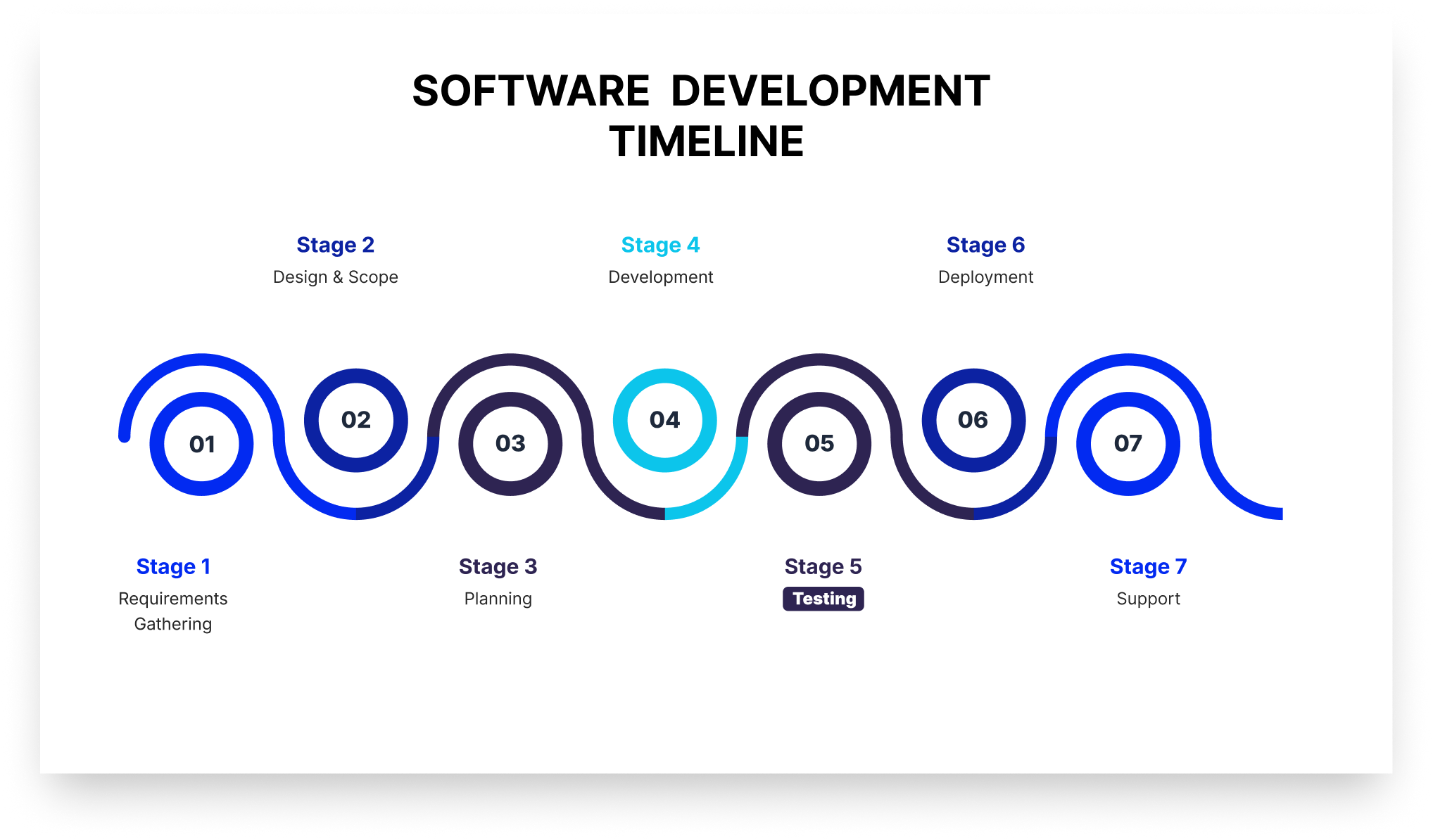
“Shifting left” moves testing toward the beginning of that line, so it runs simultaneously with the other stages of the development process.
A core benefit of shift-left testing is covers activities that prevent defects from being written at all. It reviews requirements for testability and defines acceptance criteria before a test is written. As a result, a defect caught in a requirements review never becomes code, saving time for developers.
How Shift Left Testing Is Different From Traditional Testing
The difference between traditional testing and shift-left testing is not just about the tools you're using. It's more about how and when the QA will be involved in the product development. The table below shows the difference between shift-left testing and traditional testing in various aspects.
The 4 Types of Shift Left Testing
Here are four common variants or types of shift-left testing that most agile teams follow:
1. Traditional Shift Left
Traditional shift-left testing moves testing down and slightly left on the V model (see the image below).
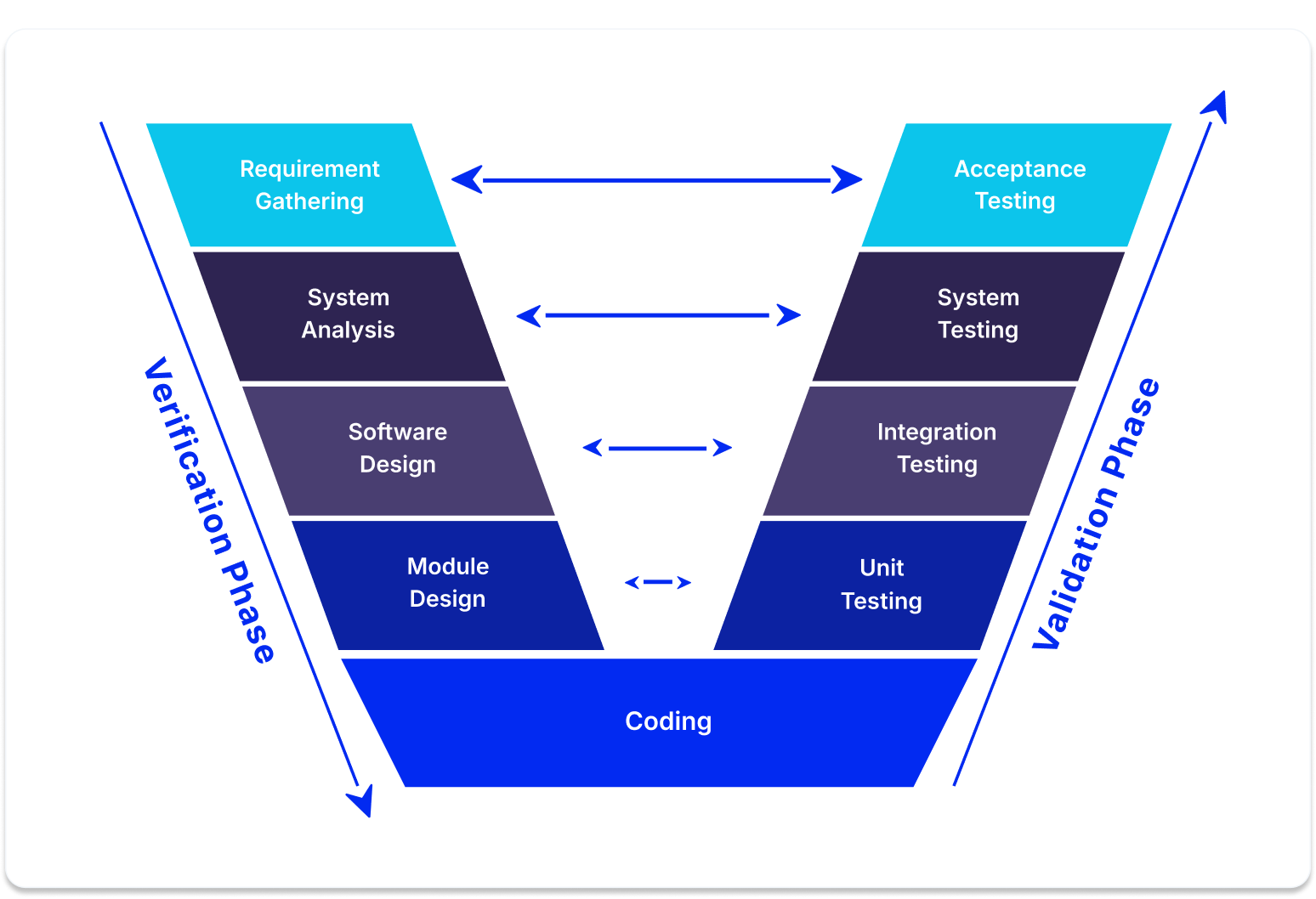
The V-Model is a step-by-step blueprint for building and testing software where every single development phase has a matching testing phase. It gets its name because the process bends upward after the coding stage, making the shape of the letter V.
It’s the type most people visualize when they talk about shift-left testing. For instance, if your team performs unit tests and integration tests early on, you’re doing traditional shift-left testing.
2. Incremental Shift Left
In incremental shift-left testing, the testing project breaks into smaller increments, each with its own V model (see the picture below).
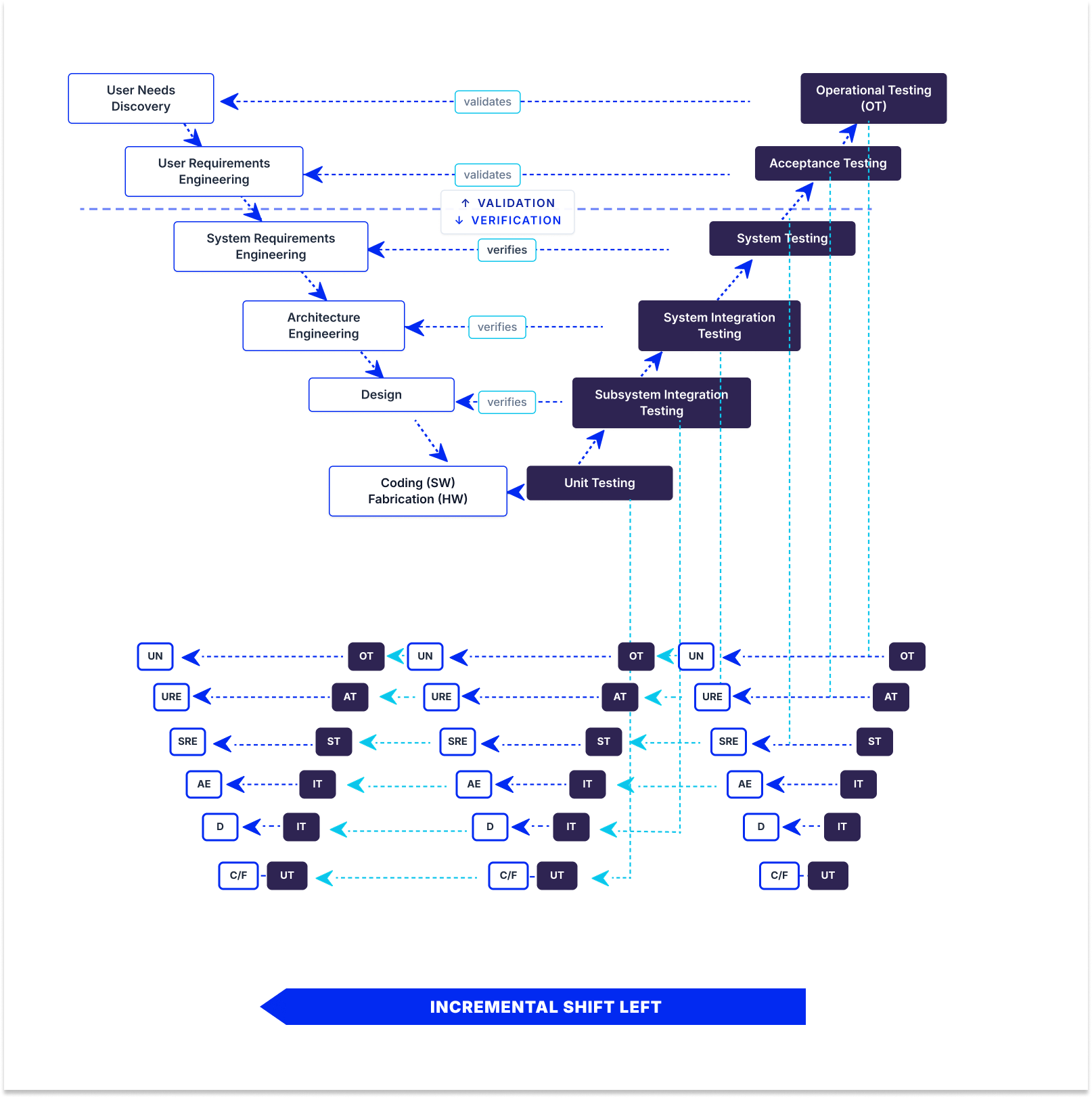
As a result, testing happens per increment rather than only once at the end. When each increment ships, developmental and operational testing shift left together. This is popular for large, complex systems with substantial hardware components, where you can’t test the whole system at once but can validate each subsystem as it’s built.
3. Agile/DevOps Shift Left
In Agile/DevOps shift-left testing, testing happens inside short sprints. Each sprint contains its own development and testing work. This means automated tests are triggered whenever there’s a code change in the CI/CD pipeline, so developers get the feedback the same day they change the code.
4. Model-Based Shift Left
Model-based shift-left testing tests your model instead of code. It tests executable requirements, architecture, and design models, so testing begins almost immediately without waiting for code. The primary benefit of model-based shift-left testing is that you can catch requirements and expensive design defects. The catch is that model-based shift-left testing requires formal, executable models, which is why there is not a large adoption of this approach.
Why DevOps Recommends Shift-Left Testing Principles
DevOps recommends shift-left testing principles for four reasons:
1. CI/CD pipelines require quality gates at every stage: A pipeline is a series of automated decisions about whether a change can proceed. If the only real check sits at the end, the pipeline isn’t deciding anything but only moving code toward one manual gate. Every stage needs its own criteria, including build, unit tests, static analysis, integration tests, and security scans.
2. Continuous deployment can’t wait for a manual QA cycle: If you deploy several times a day and your regression cycle takes three days, manual testing doesn’t work. If you stick to manual QA instead of automation, either deployment frequency drops to match testing or testing gets skipped.
3. Shared quality ownership aligns with DevOps culture: DevOps dissolves the wall between development and operations. Leaving the “wall” of testing standing between development and QA reintroduces the same problem that DevOps tries to solve.
4. Faster feedback loops reduce context switching: A developer who gets a test failure immediately after pushing the change is still holding it fresh in their head, as opposed to someone who gets it later and has to find the context again.
How Does Automated Shift Left Testing Work
Automated shift-left testing relies on running fast and inexpensive checks early in the development process. It saves slow and expensive tests for later stages when code is more stable.
The process starts at the pre-commit stage, where quick scans catch basic issues, such as formatting problems and leaked passwords. Next, when code is submitted for review, the system runs thorough unit tests and security checks within minutes. If anything fails at this review stage, the code cannot be merged into the main project.
After merging, deeper integration checks and container scans run to ensure different parts of the system work together. Finally, comprehensive performance and end-to-end tests are run before the software is released to the public. Splitting tests into these distinct stages keeps the process fast so developers actually use it.
Mistakes to Avoid When Automating for Shift-Left Testing
When implementing automated shift-left testing, avoid these common pitfalls:
- Writing tests after the fact: Tests written after code exists only confirm current behavior, including bugs, rather than validating requirements. Write tests from acceptance criteria to catch actual defects.
- Slow test suites: Tests taking longer than 10 minutes force context switching as developers change tasks. Parallelize, stage tests, and trim low-value checks to keep runs fast.
- Lack of ownership model: Clearly define who writes unit tests, maintains integration suites, and fixes broken pipelines. Without clear ownership, test suites decay and flaky tests get ignored.
- Focusing on line coverage over defect escape rate: High line coverage does not guarantee meaningful assertions. Track the defect escape rate to measure true effectiveness.
Shift Left Testing Benefits
Adopting shift-left testing offers important organizational and operational benefits, including:
- Lower defect cost: Bugs identified early in development are substantially cheaper and simpler to resolve than those discovered in production.
- Faster release cycles: Continuous quality checks eliminate long stabilization periods prior to deployment.
- Fewer production defects: Early checks catch architecture and requirements flaws before code reaches end users.
- Shorter feedback loops: Developers address feedback immediately while context is still fresh.
- Security cost reduction: Catching vulnerabilities during review avoids costly post-release incident response and patches.
- Better collaboration: Early QA involvement fosters shared quality ownership across engineering teams.
Shift Left Testing Tools Worth Knowing in 2026
Effective shift-left testing relies on a modern toolkit tailored to every phase of the development lifecycle. Here are the top tools and frameworks essential for implementing shift-left testing in 2026:
Static Analysis and Secret Scanning
SonarQube: Analyzes source code for bugs and security vulnerabilities, enforcing quality gates directly on pull requests.
Semgrep: Lightweight static analysis using custom, code-like rules for fast feedback during development.
TruffleHog & Gitleaks: Scan repositories and commit histories via pre-commit hooks to catch secrets and API keys before they are pushed.
Unit and Integration Testing
JUnit, pytest & Jest: Essential unit testing frameworks for Java, Python, and JavaScript to build fast, automated test suites.
Testcontainers: Provides throwaway Docker instances for databases and services, removing shared-environment bottlenecks during integration tests.
API and Contract Testing
Postman & Newman: Enables teams to author API tests in a GUI and execute them automatically in CI/CD pipelines.
Pact: Facilitates consumer-driven contract testing to verify microservices independently without full deployments.
Dependency and Container Security
Snyk automatically scans third-party dependencies for vulnerabilities and opens automated pull requests for fixes.
Trivy: Fast open-source scanner for container images, filesystems, and infrastructure as code.
Trivy is an open-source scanner covering container images, filesystems, and infrastructure as code, fast enough to sit inside a build without slowing it down.
CI/CD Orchestration
GitHub Actions, GitLab CI & Jenkins: Automate and orchestrate pipeline stages, enforcing quality gates before code merges.
Shift Left vs. Shift Right Testing: What’s the Difference
Shift-left testing moves testing (left) earlier in the process, alongside or even before development. Shift-right testing moves testing (right) later into the process, into the production environment, with real data.
The entire concept of shift-right testing is that some defects cannot be truly uncovered before real users hit real infrastructure, so it tests on actual traffic patterns, third-party behavior under load, and edge cases.
TestFiesta Gives Your Shift Left Strategy Somewhere to Land
Shift-left testing aggregates results across multiple systems (CI unit tests, post-merge contract tests, PR security scans, and sprint exploratory sessions), often making release readiness difficult to track.
TestFiesta consolidates these sources into a single view by ingesting automated CI pipeline results alongside manual and exploratory test outcomes through its Automation API.
Reusable configurations allow test cases to execute across multiple browsers, devices, and environments without duplication, while shared steps centralize common workflows like login or checkout to streamline suite maintenance.
Built-in defect tracking connects failures directly to test executions. Integrations with Jira and GitHub automatically sync fields, update statuses, and create context-rich issues from failed runs.
Organizations use folders, tags, and custom fields to map automated run data. Pricing is a flat $10 per user per month with all features included.
FAQs
Does shift-left testing mean developers replace QA engineers?
No, shift-left testing does not mean that developers replace QA engineers. It changes what QA spends time on. Repetitive testing is automated, and developers write tests alongside their code, while QA moves toward work that requires critical judgment, such as reviewing requirements for testability, designing test strategy, exploratory testing, and owning the quality signal.
How do you measure whether shift-left testing is actually working?
To measure whether shift-left testing is actually working, you should track essential software testing metrics, including defect escape rate, the percentage of defects found in production rather than before release, mean time to detect, and pipeline duration, since a slow pipeline gets bypassed.
What’s the difference between shift-left testing and test-driven development (TDD)?
Shift-left testing is a broad strategy that moves all quality activities, including requirements reviews, static analysis, and security scans, earlier in the development process. Test-driven development (TDD) is just one specific practice within that broader strategy, where you write a failing test before writing the code to pass it and refactor the results. Simply put, you can practice shift-left testing without using TDD, but you cannot do TDD without shifting left.