

Back to Blog
Best practices

The Testing Pyramid: A Complete Guide With Best Practices

Learn how to implement the Testing Pyramid; Unit, Integration, and E2E tests; to achieve fast feedback, high reliability, and cost-effective software testing.

Saud Ahmed
June 26, 2026
June 26, 2026
The Testing Pyramid: A Complete Guide With Best Practices

Best practices

The Testing Pyramid: A Complete Guide With Best Practices

by:

Saud Ahmed

June 26, 2026

8

min

Share:

On this page

Ready to take your testing to
the next level?

Sleek and intuitive workflows
Transparent pricing
Easy migration

Introduction

The testing pyramid has always been a relevant model in software testing, now even more with software teams involved in complex products. Distributed architectures, continuous deployment, and automation-heavy workflows demand testing strategies that scale without breaking. 

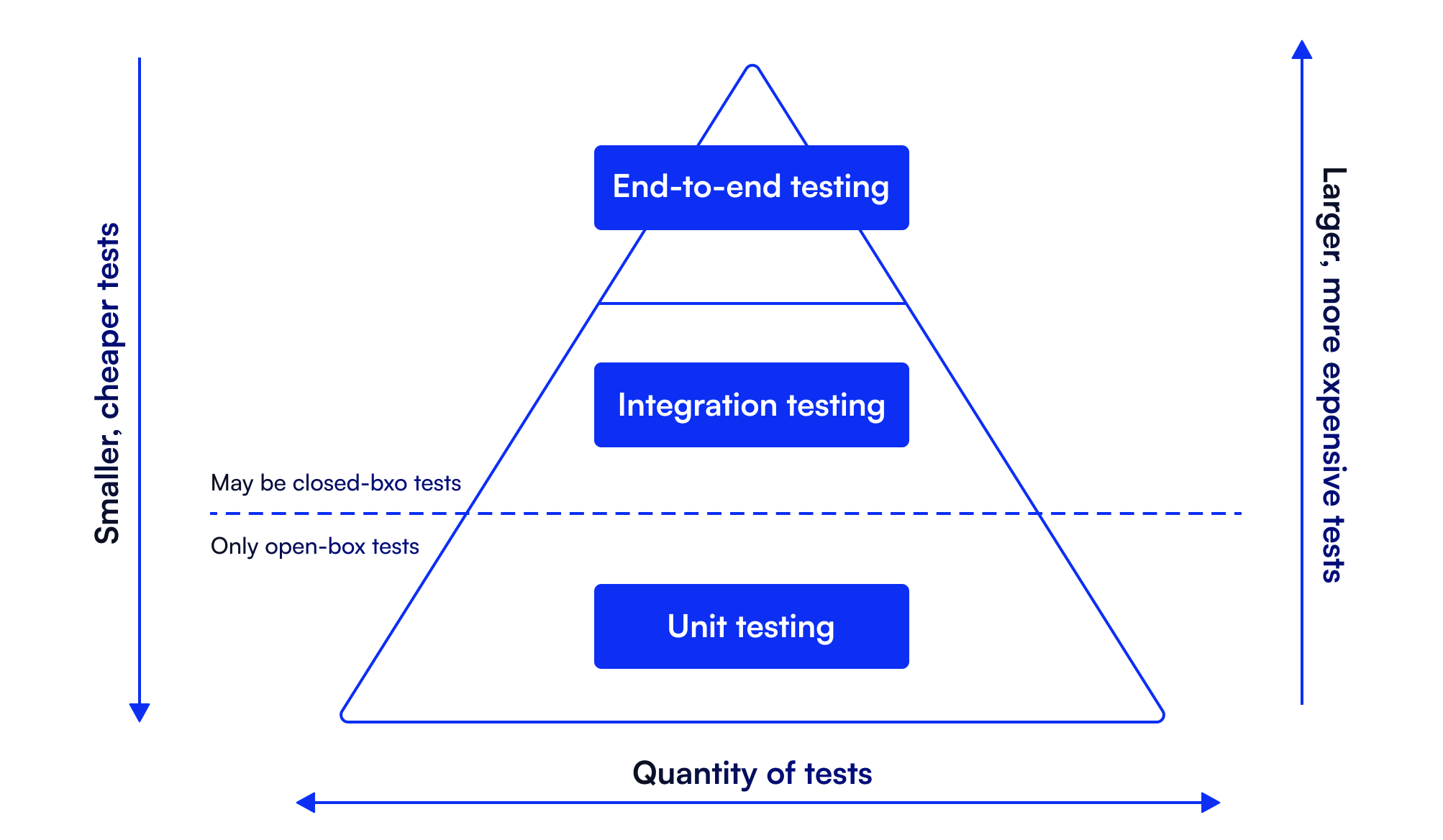
The testing pyramid addresses this by organizing tests into three layers: 

  • a broad base of fast unit tests
  • a middle tier of integration tests
  • a narrow top of end-to-end validation

This structure prevents overreliance on slow, brittle system tests while maintaining comprehensive coverage. 

What Is the Testing Pyramid?

The testing pyramid is a strategy for organizing automated tests based on scope, speed, and cost. Introduced to counter excessive dependence on high-level UI testing, it recommends:

  • Unit tests at the base: Validate individual functions and methods in isolation
  • Integration tests in the middle: Verify how components interact
  • End-to-end tests at the top: Confirm complete workflows from the user's perspective

The principle is simple: write more tests at lower levels. 

Unit tests run in milliseconds and pinpoint failures precisely, integration tests catch communication issues between services, and E2E tests validate critical paths but consume more resources and break more easily.

A well-implemented pyramid delivers:

  • Defects caught during development, not deployment
  • Lower maintenance overhead
  • Faster CI/CD pipelines
  • Reliable feedback loops

Key Characteristics of the Testing Pyramid

What makes the testing pyramid model unique is:

  • Scope expands upward: Unit tests examine single functions, Integration tests validate module interactions, and E2E tests simulate user behavior across the entire system.
  • Speed decreases upward: Unit tests execute in milliseconds, integration tests involve databases or APIs and take seconds, and E2E tests require full environments and may run for minutes.
  • Maintenance cost increases upward: Unit tests rarely break unless logic changes. E2E tests depend on UI stability, infrastructure configuration, and third-party services—any of which can cause failures unrelated to actual bugs.

The Three Layers of the Testing Pyramid Explained

Here is a detailed explanation of the three layers of the testing pyramid:

Unit Tests: The Foundation

Unit tests form the largest layer, validating individual functions or classes under controlled conditions. Developers write these during feature development to ensure isolated logic behaves correctly.

What they validate:

  • Business logic and algorithms
  • Input/output behavior
  • Edge cases and error handling
  • Conditional flows

Why they matter: Speed and precision. A failing unit test identifies the exact function causing the problem. Because they run quickly, they integrate seamlessly into development workflows, and developers get immediate feedback on every change. This tight feedback loop prevents defects from spreading through the codebase. Fix the issue at the source before it requires debugging across multiple layers.

Integration Tests: The Middle Layer

Integration tests verify that modules, services, or components communicate correctly. Unlike unit tests, they validate behavior across boundaries.

What they validate:

  • API interactions and responses
  • Database queries and persistence
  • Service-to-service communication
  • Data transformation across layers

Why they matter: Modern applications consist of interconnected services. Microservices, external APIs, and databases must exchange data reliably. Integration tests catch problems that unit tests cannot: schema mismatches, incorrect API contracts, and failed service handshakes. These tests are slower than unit tests but faster and more stable than E2E tests, striking a balance between coverage and execution time.

End-to-End Tests: The Top

E2E tests simulate complete user workflows, validating the system as a whole. They interact with the UI or public APIs exactly as users would.

What they validate:

  • Full user journeys (login, checkout, account management)
  • Cross-service workflows
  • UI behavior and rendering
  • System-level functionality

Why they matter: They confirm the application works in real-world scenarios. All components—frontend, backend, APIs, databases—must function together seamlessly.

The tradeoff: E2E tests are slow and fragile. UI changes, infrastructure issues, or timing problems can break them even when the underlying functionality is sound. Keep this layer small and focused on critical paths.

Benefits of the Testing Pyramid

Implementing the testing pyramid in your strategy results in several key long-term advantages.

Balanced Test Distribution

The pyramid prevents overinvestment in any single testing approach. A large base of unit tests provides rapid validation of core logic. Integration tests catch interaction failures. A small set of E2E tests confirms system-level behavior. This balance avoids two common pitfalls: testing exclusively at the unit level (missing integration bugs) or relying on E2E tests (slow, expensive, brittle).

Early Bug Detection

Most defects surface in unit tests, immediately after code is written. Developers fix issues before they propagate to other components. Integration tests then catch communication problems before system testing begins. This layered detection prevents bugs from reaching production and reduces debugging time. Finding a logic error in a unit test takes minutes. Tracking down the same issue through an E2E failure can take hours.

Faster Feedback Loops

Unit and integration tests execute quickly enough to run after every commit. Developers know within seconds whether their changes broke existing functionality. Fast feedback eliminates bottlenecks in CI/CD pipelines. Long-running E2E tests can run later in the pipeline without slowing down earlier validation stages.

Optimized Resource Allocation

Unit tests are cheap: they require no infrastructure, run in milliseconds, and rarely need updates. E2E tests are expensive: they demand full environments, UI automation tools, and constant maintenance. The testing pyramid ensures most validation happens through low-cost tests, reserving expensive E2E tests for scenarios where they provide unique value. This reduces infrastructure costs and testing overhead while maintaining coverage.

Common Challenges of the Testing Pyramid

Before you practice the testing pyramid to scale your software testing strategies, here are some common challenges to be wary of:

Ambiguous Test Classification

Without clear conventions, teams misclassify tests. A test labeled “unit” may actually depend on databases or external services, behaving like an integration test. This blurs the pyramid structure. Teams believe they have a strong unit test foundation when many tests are actually slower, more complex integration tests.

Solution: Establish naming conventions that reflect the test scope. Unit tests should never touch databases, APIs, or the filesystem.

Oversimplification for Complex Architectures

The three-tier model doesn’t always map cleanly to modern systems. Microservices, asynchronous workflows, and API-heavy architectures introduce testing layers that fall between traditional categories.

API contract testing, service virtualization, and component testing may require their own strategies. The pyramid provides a framework, not a rigid rulebook.

Solution: Adapt the model to your architecture. Add layers if needed, but maintain the core principle: more fast tests, fewer slow tests.

Test Maintenance Burden

As applications evolve, tests require updates. UI changes break E2E tests. API modifications fail integration tests. Refactored code invalidates unit tests. Without regular maintenance, test suites become unreliable. Teams ignore failures or spend excessive time updating tests instead of building features.

Solution: Treat tests as production code. Refactor regularly, eliminate duplication, and delete obsolete tests.

Flaky Tests

Flaky tests pass sometimes and fail others without code changes. They erode trust in automation and waste time.

Common causes of flaky tests include:

  • Network instability in integration tests
  • Timing issues in E2E tests
  • Dependencies on external services
  • Non-deterministic code (random data, timestamps)

Solution: Isolate flaky tests immediately. Fix or remove them before they spread. Use stable selectors in UI tests, mock external dependencies, and implement proper wait strategies.

Environment Configuration

Integration and E2E tests require realistic environments. Databases, authentication services, message queues, and APIs must be configured correctly. Inconsistent environments cause tests to fail unpredictably. A test that passes locally may fail in CI due to missing dependencies or incorrect configuration.

Solution: Use containerization (Docker) or infrastructure-as-code to ensure consistent, reproducible environments. Automate environment setup as part of the test pipeline.

The Testing Pyramid in Agile and DevOps

Agile development integrates testing throughout the development cycle rather than treating it as a final phase. Teams write tests alongside code, running them continuously to catch issues early. Automation enables this approach. 

Without fast, reliable tests, continuous integration breaks down. The testing pyramid provides the structure agile teams need: fast tests for immediate feedback, broader tests for integration confidence, and targeted E2E tests for release validation.

How Does Shift-Left Testing Apply to the Testing Pyramid?

Shift-left testing moves validation earlier in the development lifecycle. Instead of testing after coding completes, teams test during design, development, and code review.

Applied to the pyramid, shift-left means:

  • Writing unit tests before or immediately after implementing features
  • Running integration tests during feature development
  • Catching issues in code review, not in staging environments

This approach reduces the cost of fixing defects. A bug caught in a unit test costs minutes to fix. The same bug discovered in production costs hours or days.

Shared Responsibility

Agile teams share ownership of quality. Developers write unit and integration tests. QA engineers focus on exploratory testing, complex scenarios, and E2E validation. DevOps engineers ensure test environments and pipelines run reliably. This collaboration prevents quality from becoming a bottleneck. Everyone contributes to test coverage, and no single role gates releases.

Evolution Beyond the Classic Pyramid

Some teams adopt alternative models: the Testing Trophy (emphasizing integration tests), the Testing Diamond (balancing integration and E2E tests equally), or custom structures reflecting their architecture. These variations share the same principle: structure tests intentionally based on speed, cost, and scope. The specific shape matters less than the underlying discipline.

The Testing Pyramid Best Practices

When adopting the testing pyramid in your workflow, here are some best practices to follow:

Unit Testing

Some best practices for unit testing are:

  • Keep tests isolated: Unit tests should never depend on databases, APIs, or external services. Use mocks or stubs for dependencies. Tests that require infrastructure belong in the integration layer.
  • Run tests frequently: Unit tests should execute after every code change. Keep them fast enough to run in seconds, not minutes.
  • Write tests during development: Don’t defer testing. Write tests as you implement features, or adopt test-driven development (TDD) to write tests first.
  • Make failures obvious: Test names should clearly describe what they validate. When a test fails, developers should immediately understand what broke.

Integration Testing

Here are a few key steps for integration testing: 

  • Focus on critical interactions: Don’t test every possible combination of components. Identify the most important service communications—API calls, database queries, message exchanges—and validate those.
  • Use stable environments: Integration tests require consistent dependencies. Use containers, mock services, or controlled test data to eliminate environmental variability.
  • Provide clear diagnostics: When an integration test fails, the error message should identify which service or interaction caused the problem. Vague failures waste debugging time.

End-to-End Testing

Some best practices for end-to-end testing:

  • Limit scope to critical workflows: E2E tests are expensive. Focus on high-value paths: user registration, checkout, core product functionality. Don’t replicate unit or integration test coverage at the E2E layer.
  • Build resilient tests: Use stable element selectors, implement proper wait strategies, and design tests to tolerate minor UI changes. Fragile tests create maintenance overhead and erode trust.
  • Run strategically in pipelines: Execute E2E tests at later pipeline stages, not on every commit. Let unit and integration tests provide fast feedback while E2E tests validate releases.

Bring Your Testing Pyramid to Action in TestFiesta

TestFiesta provides the infrastructure to implement the testing pyramid effectively across all three layers.

  • Streamlined Workflows: Centralized test repositories, rapid execution, and real-time reporting help catch issues immediately, which is particularly helpful in unit testing. 
  • Efficient Integration Testing: Comprehensive collaboration, flexible testing environments, and detailed test plans, test runs, and milestones ensure reliable validation of each feature.
  • Targeted E2E Testing: TestFiesta enables cross-browser support and strategic CI/CD integration that prevents pipeline slowdowns for E2E testing.
  • Analytics and Continuous Improvement: Visualize coverage across the pyramid, track flaky tests, and identify gaps. Shared dashboards give teams visibility into test health and progress.

TestFiesta combines speed, reliability, and actionable insights to help teams maintain fast feedback loops, strong coverage, and confident releases.

Conclusion

The testing pyramid structures automated testing for speed, reliability, and cost-efficiency. A strong foundation of unit tests provides immediate feedback. Integration tests validate component interactions. A small layer of E2E tests confirms critical workflows.

In agile and DevOps environments, the pyramid enables early bug detection, faster releases, and shared ownership of quality. Challenges like flaky tests and environment complexity are manageable with disciplined practices and the right tools.

It’s a practical framework for building maintainable, scalable software. Teams that apply it consistently deliver reliable applications faster, with less friction and greater confidence.

FAQs

What is the QA testing pyramid in software testing? 

The QA testing pyramid in software testing is a framework that organizes automated tests into three layers: unit tests (base), integration tests (middle), and E2E tests (top). It emphasizes faster, more reliable tests at lower levels and fewer complex tests at higher levels.

Why should agile teams use the testing pyramid?

Agile teams should adopt the testing pyramid because it aligns with iterative development by enabling continuous testing. Fast unit tests catch defects during development, while integration and E2E tests validate broader functionality without slowing delivery.

What does the test pyramid emphasize?

The testing pyramid emphasizes speed, reliability, and efficiency. It suggests that most tests should fall under fast unit tests, integration tests should validate interactions, and E2E tests should focus on critical workflows. This structure maximizes feedback speed while minimizing cost.

What is pyramid automation? 

Pyramid automation refers to automating tests according to pyramid principles: extensive unit test automation for rapid feedback, integration test automation for component validation, and targeted E2E automation for critical paths.

Do the layers in the testing pyramid overlap? 

Yes, some overlap occurs in the testing pyramid, especially between integration and E2E tests. While overlap isn’t necessarily an issue, the key is avoiding redundant coverage, ensuring each test validates something unique to its layer.

Which is the most important layer of the testing pyramid?

The unit test layer can be considered the “most important” layer of the testing pyramid. It provides the foundation, catches most defects early, runs fastest, and costs least to maintain. However, all three layers are necessary for comprehensive validation.

Tool

Pricing

TestFiesta

Free user accounts available; $10 per active user per month for teams

TestRail

Professional: $40 per seat per month

Enterprise: $76 per seat per month (billed annually)

Xray

Free trial; Standard: $10 per month for the first 10 users (price increases after 10 users)

Advanced: $12 per month for the first 10 users (price increases after 10 users)

Zephyr

Free trial; Standard: ~$10 per month for first 10 users (price increases after 10 users)

Advanced: ~$15 per month for the first 10 users (price increases after 10 users)

qTest

14‑day free trial; pricing requires demo & quote (no transparent pricing)

Qase

Free: $0/user/month (up to 3 users)

Startup: $24/user/month

Business: $30/user/month

Enterprise: custom pricing

TestMo

Team: $99/month for 10 users

Business: $329/month for 25 users

Enterprise: $549/month for 25 users

BrowserStack Test Management

Free plan available

Team: $149/month for 5 users

Team Pro: $249/month for 5 users

Team Ultimate: Contact sales

TestFLO

Annual subscription (specific amounts per user band), e.g., Up to 50 users: $1,186/yr; Up to 100 users: $2,767/yr; etc.

QA Touch

Free: $0 (very limited)

Startup: $5/user/month

Professional: $7/user/month

TestMonitor

Starter: $13/user/month

Professional: $20/user/month

Custom: custom pricing

Azure Test Plans

Pricing tied to Azure DevOps services (no specific rate given)

QMetry

14‑day free trial; custom quote pricing

PractiTest

Team: $54/user/month (minimum 5 users)

Corporate: custom pricing

Black Box Testing

White Box Testing

Coding Knowledge

No code knowledge needed

Requires understanding of code and internal structure

Focus

QA testers, end users, domain experts

Developers, technical testers

Performed By

High-level and strategic, outlining approach and objectives.

Detailed and specific, providing step-by-step instructions for execution.

Coverage

Functional coverage based on requirements

Code coverage

Defects type found

Functional issues, usability problems, interface defects

Logic errors, code inefficiencies, security vulnerabilities

Limitations

Cannot test internal logic or code paths

Time-consuming, requires technical expertise

Aspect

Test Plan

Test Case

Purpose

Defines the overall testing strategy, scope, and approach for a project or release.

Validates that a specific feature or functionality works as expected.

Scope

Covers the entire testing effort, including what will be tested, resources, timelines, and risks.

Focuses on a single scenario or functionality in the broader scope.

Level of Detail

High-level and strategic, outlining approach and objectives.

Detailed and specific, providing step-by-step instructions for execution.

Audience

Project managers, stakeholders, QA leads, and development teams.

QA testers and engineers.

When It's Created

Early in the project, before testing begins.

After the test plan is defined and the requirements are clear.

Content

Scope, objectives, strategy, resources, schedule, environment details, and risk management.

Test case ID, title, preconditions, test steps, expected results, and test data.

Frequency of Updates

Updated periodically as project scope or strategy changes.

Updated frequently as features change or bugs are fixed.

Outcome

Provides direction and clarifies what to test and how to approach it.

Produces pass or fail results that indicate whether specific functionality works correctly.

Tool

Key Highlights

Automation Support

Team Size

Pricing

Ideal For

TestFiesta

Flexible workflows, tags, custom fields, and AI copilot

Yes (integrations + API)

Small → Large

Free solo; $10/active user/mo

Flexible QA teams, budget‑friendly

TestRail

Structured test plans, strong analytics

Yes (wide integrations)

Mid → Large

~$40–$74/user/mo)

Medium/large QA teams

Xray

Jira‑native, manual/
automated/
BDD

Yes (CI/CD + Jira)

Small → Large

Starts ~$10/mo for 10 Jira users

Jira‑centric QA teams

Zephyr

Jira test execution & tracking

Yes

Small → Large

~$10/user/mo (Squad)

Agile Jira teams

qTest

Enterprise analytics, traceability

Yes (40+ integrations)

Mid → Large

Custom pricing

Large/distributed QA

Qase

Clean UI, automation integrations

Yes

Small → Mid

Free up to 3 users; ~$24/user/mo

Small–mid QA teams

TestMo

Unified manual + automated tests

Yes

Small → Mid

~$99/mo for 10 users

Agile cross‑functional QA

BrowserStack Test Management

AI test generation + reporting

Yes

Small → Enterprise

Free tier; starts ~$149/mo/5 users

Teams with automation + real device testing

TestFLO

Jira add‑on test planning

Yes (via Jira)

Mid → Large

Annual subscription starts at $1,100

Jira & enterprise teams

QA Touch

Built‑in bug tracking

Yes

Small → Mid

~$5–$7/user/mo

Budget-conscious teams

TestMonitor

Simple test/run management

Yes

Small → Mid

~$13–$20/user/mo

Basic QA teams

Azure Test Plans

Manual & exploratory testing

Yes (Azure DevOps)

Mid → Large

Depends on the Azure DevOps plan

Microsoft ecosystem teams

QMetry

Advanced traceability & compliance

Yes

Mid → Large

Not transparent (quote)

Large regulated QA

PractiTest

End‑to‑end traceability + dashboards

Yes

Mid → Large

~$54+/user/mo

Visibility & control focused QA

Related Articles

Introduction

Unit tests are one of the most common types of tests in software testing. Unit testing is often treated as a checkbox activity: write the code, add some tests, hit 80% coverage, and call it a day. But if your tests are weak, slow, or fail to catch bugs before they reach production, you are not reaping the benefits of unit tests in practice. In this guide, we look at what unit testing really means in modern development, what a “unit” actually refers to, the AAA pattern of writing unit tests, and five common misconceptions that cause fragile test suites.

What Is a Unit Test in Software Development

A unit test is a piece of code that calls a small, isolated piece of application code, usually a function, method, or class, and verifies that it behaves correctly for a specific input and condition. It runs in milliseconds, needs no external systems (no database, no network, no filesystem), and produces the same pass or fail result every single time.

Unit tests are isolated, which means a unit test doesn’t check how two components work together (that happens in an integration test). A unit test checks one unit of behavior, under controlled conditions, with external dependencies either removed or replaced with stand-ins. Both unit tests and integration tests are part of the testing pyramid.

To make it clearer, think of testing as a circuit board. You test each component on its own before assembling the board. If a component works alone but the assembled board fails, you have an assembly problem, not a component problem. Unit tests give you that same certainty: when one fails, you know exactly which piece broke.

What Exactly Is a “Unit” in Testing

The word “unit” has no fixed definition in testing literature. That ambiguity is intentional. Here’s what experts consider unit in different circumstances:

  • In procedural programming, a unit is typically a single function.
  • In object-oriented programming, a unit is commonly a class or a tightly related cluster of classes.
  • In practice, a unit is whatever your team decides makes sense to test in isolation, such as a single method, a class, or a small module. The definition matters less than the consistency.

How to Write a Good Unit Test: The AAA Pattern and What Comes After

Every well-written unit test follows the same three-part structure, usually called Arrange-Act-Assert (AAA). The pattern is simple, but what makes a good unit test is the discipline of keeping each part honest.

Arrange: Set Up the Conditions

Create the object under test, prepare the inputs, and configure any test doubles. Keep this section as minimal as possible. Only the setup that’s directly relevant to this specific test case belongs here. 

A useful design signal is that if the arrange section is longer than the act and assert sections combined, the unit under test probably has too many dependencies. That means there is a problem with the design, not with the unit.

Act: Execute the Behavior

In this stage, call the function or method being tested. In the vast majority of cases, this should be a single line. If invoking the behavior takes multiple lines, the API is probably too complex. One test should have one act. If you’re testing two behaviors, write two tests. Combined tests produce combined failures, and combined failures take twice as long to diagnose.

Assert: Verify the Outcome

Check that the output or state change matches what you expected. Aim for one logical assertion per test. That doesn’t necessarily mean one assert statement; it means one logical thing being verified. Asserting three properties of the same returned object is fine. Asserting five unrelated behaviors is not. A test that checks five unrelated things tells you something failed, but not exactly what. A test with one logical assertion produces a failure message that diagnoses itself.

A Secret Tip: Verify That the Test Can Fail

Before you call a unit test done, confirm it actually catches the bug it’s designed to catch. Comment out or stub the production logic and run the test. If it still passes, it’s not testing what you think it is. This takes 30 seconds and catches a surprisingly common class of test: one that executes the code without validating the behavior. These tests inflate coverage numbers while providing zero quality signal, and they’re invisible until the day the code they “cover” breaks in production with every test still green.

5 Unit Testing Myths That Produce Bad Test Suites

Most bad test suites are written due to the five misconceptions that do the most damage.

Myth 1: 100% coverage means the code is tested. Coverage measures execution, not verification. A test that calls every function without meaningful assertions produces 100% statement coverage and zero quality signal. Treat coverage as a floor, not a ceiling: below 70 to 80% branch coverage on core logic is a red flag, but hitting 100% proves nothing on its own. 

Myth 2: You have to mock everything to isolate the unit. Over-mocking creates tests that are tightly coupled to implementation details. Refactor the internals without changing the behavior, and the tests break anyway, which trains developers to distrust and eventually ignore them. Tests should verify what the code does, not how it does it. Use real internal collaborators when they’re fast and deterministic. Reserve mocks for architectural boundaries: the database, the network, the clock, the filesystem.

Myth 3: Unit tests replace integration tests. Unit tests verify that each piece works in isolation. Integration tests verify that the pieces work together. A codebase with 100% unit coverage and zero integration tests has no guarantee that its database queries return what the code expects, that its API calls handle real responses, or that its services actually talk to each other. Both are necessary. Neither replaces the other.

Myth 4: Slow tests are fine if they’re thorough. A unit test suite that takes more than a couple of minutes to run is a waste of time and context, so developers start avoiding running it in the first place. When it doesn’t run, it doesn’t catch the bugs. The entire value of unit testing lives in the feedback loop: run tests after every change and catch bugs while the context is still in your head. That loop only works when tests are fast enough to run constantly. If your unit tests are slow, there’s something wrong with them.

Myth 5: Every line of code needs a unit test. Unit tests shine on pure logic, functions with deterministic outputs. Code that’s primarily I/O, such as database writes, HTTP calls, file operations, and UI rendering, is better covered by integration and end-to-end tests (the other two testing types in the testing pyramid). Forcing unit tests onto I/O-heavy code produces brittle mocking setups that shatter on every refactor. 

TestFiesta Simplifies Test Management for Your Entire Unit Test Suite

Unit tests generate the most granular quality signal in software development, and that signal dies in a terminal window. It lives in a developer’s local output, a CI log, or a coverage report that nobody outside engineering ever opens.

So when the QA lead asks if they’re ready to ship, you can’t hand them a Jest summary or a pytest report. What you need is a visible, trackable, and actionable insight. 

TestFiesta is a test management platform that closes that gap. It takes the signal your unit tests already generate and makes it visible, trackable, and actionable at the team level with structured test case organization, pass/fail tracking across CI runs, coverage visibility for stakeholders who don’t read terminal output, and an audit trail that turns “the unit tests passed” into a release readiness statement the whole team can stand behind.

Ready to turn your unit tests into a source of truth?

Stop burying your test quality in terminal logs. TestFiesta helps you organize, track, and report on your unit test suite, giving your entire team the visibility they need to ship with confidence.

Start your free trial today

FAQs

What’s the difference between a unit test and an integration test?

A unit test verifies a single piece of code in complete isolation, with no database, network, or external services involved. It runs in milliseconds and pinpoints exactly which function failed. An integration test verifies that multiple components work correctly together, using real databases, real API calls, and real service interactions. Learn the difference between unit tests and integration tests in the testing pyramid blog.

Should unit tests be written before or after the code?

Unit tests can be written before or after the code. But writing tests first (Test-Driven Development) is favored more by the experts. Case studies at Microsoft and IBM found teams practicing TDD shipped with 40 to 90% lower pre-release defect density than comparable teams that didn’t, at the cost of moderately longer development time. 

How many unit tests should a codebase have?

There’s no universal number for tests to be in a codebase. The right metric is branch coverage on business-critical code. A reasonable target for most production codebases is 70 to 80% branch coverage on core business logic, with lower thresholds acceptable for UI rendering, configuration, and I/O orchestration layers.

Best practices
Testing guide

Introduction

Most testing failures have nothing to do with bad test cases. They happen because the environment the tests run in is broken, misconfigured, or occupied by another team. A test suite is only as reliable as the environment behind it..

This guide covers what test environment management involves, why it matters, and the practices that separate teams who ship confidently from teams who fight every release.

What Is Test Environment Management in Software Testing

Test environment management is the process of planning, provisioning, configuring, and maintaining the environments where software gets tested before release. An environment here means the full stack: hardware, servers, operating systems, databases, networks, third-party integrations, and test data, all configured to support a specific type of testing.

The goal is simple: Give every team a stable, production-like environment that is ready when they need it, with the right data and configurations in place. That's why mature teams treat TEM as an ongoing discipline rather than a one-time setup task. Environments change constantly as code, data, and infrastructure evolve. Managing that change is the job.

Essential Components of a Test Environment

A test environment is more than a server with your application installed on it. It's a combination of infrastructure, software, data, and tooling that together replicate the conditions your software will face in production. Here's what goes into one.

Hardware infrastructure

This is the physical or virtual foundation: servers, networking, and storage. It includes the machines running your application, the network configurations connecting them, and the storage systems holding databases and files. Whether hosted on-premises or in the cloud, the hardware layer needs enough capacity to support realistic testing. An environment that's significantly underpowered compared to production will produce misleading performance results.

Software stack

On top of the hardware sits everything your application needs to run: the operating system, databases, middleware, web servers, and the application under test itself, along with its dependencies and third-party integrations. Version alignment matters here. If production runs PostgreSQL 16 and your test environment runs 14, you're testing against conditions that don't exist in the real world.

Test data management

Test data management is a critical component of TEM. Tests need data that behaves like production data: realistic volumes, edge cases, and formats. Teams typically get this by generating synthetic data or by masking and anonymizing production copies. Privacy is a hard constraint, not an afterthought. Regulations like GDPR and HIPAA restrict how personal data can be used, so any production data pulled into a test environment needs to be anonymized or masked before testers touch it.

Configuration management and version control

Every environment carries configuration: connection strings, environment variables, feature flags, API keys, and deployment settings. Managing these manually leads to drift, where environments slowly diverge from each other and from production. Storing configurations in version control and applying them through automated tools keeps environments reproducible and makes it possible to trace exactly what changed when something breaks.

Monitoring and maintenance

You can't manage an environment you can't see into. Monitoring covers resource usage, uptime, and service health, while logging and tracing tools help diagnose failures when tests break. Observability also answers a question every QA team deals with: was that a real defect, or an environment problem? Without visibility, teams waste hours debugging test failures that turn out to be a full disk or a stopped service.

Types of Test Environments

Different testing stages need different environments. Each type serves a specific purpose, and the level of production fidelity increases as code moves closer to release.

Development environments are where engineers write and test code locally or in shared sandboxes. They prioritize speed over realism: lightweight setups, mocked dependencies, and fast feedback loops for unit testing and debugging. Stability matters less here because the environment exists to support rapid iteration.

Integration testing environments verify that individual modules, services, and third-party systems work together. This is where mocked dependencies get replaced with real connections: actual APIs, databases, and message queues. Integration environments catch the failures that unit tests can't, like mismatched data contracts between services.

System testing environments host the complete, assembled application so QA can test it end to end. The full software stack runs here, configured close to production specs, allowing teams to validate functional requirements and complete user workflows across the entire system.

User Acceptance Testing (UAT) environments are where business stakeholders and end users validate that the software meets requirements before release. UAT environments need realistic data and production-like behavior, because the people testing here aren't engineers. They're checking whether the software actually works for the business, not whether the code is correct.

Performance testing environments exist to measure how the system behaves under load: stress tests, spike tests, endurance runs. These environments need to match production capacity as closely as possible, because performance results from an undersized environment don't translate. They're often provisioned on demand due to their resource cost.

Staging or pre-production environments are the final checkpoint: a mirror of production, running the same versions, configurations, and infrastructure. Staging is where teams run final regression tests, smoke tests, and deployment rehearsals. The closer staging matches production, the fewer surprises on release day.

Why Test Environment Management Matters: Business Impact and ROI

TEM rarely gets attention until something breaks. But the gap between teams that manage environments deliberately and teams that don't shows up directly in release velocity, defect rates, and engineering costs.

The Cost of Poor Test Environment Management

The core economics are well established: the later a defect is found, the more it costs to fix. A bug caught during design is a quick edit. The same bug caught in production means incident response, hotfixes, rollbacks, and sometimes customer-facing damage. The Consortium for Information and Software Quality (CISQ) put the cost of poor software quality in the US at $2.41 trillion annually in its 2022 report, with operational failures making up the largest share.

Poor environment management feeds this problem in specific ways:

  • Production incidents from environment inconsistencies. When staging doesn't match production, defects pass testing cleanly and surface only after release. "It worked in QA" is almost always an environment problem.
  • Lost developer productivity. Every hour an environment is down, misconfigured, or blocked by another team is an hour of testing that doesn't happen. Teams end up debugging infrastructure instead of shipping features.
  • Delayed releases. Environment contention and setup delays stretch test cycles, which pushes release dates. In competitive markets, that's not just an engineering problem. It's missed revenue.

Key Benefits of Effective Test Environment Management

Teams that get TEM right see gains across the delivery pipeline:

  • Faster time-to-market. Environments that are ready on demand remove one of the most common bottlenecks in the release cycle. Testing starts when the code is ready, not when infrastructure becomes available.
  • Higher software quality. Production-like environments catch defects that unrealistic setups miss, which means fewer bugs reach users.
  • Better team productivity. Testers test, developers develop. Nobody burns a sprint chasing a config mismatch.
  • Compliance and audit readiness. Controlled environments with tracked configurations and masked test data make it far easier to demonstrate compliance with regulations like GDPR and HIPAA.
  • Lower infrastructure costs. Visibility into environment usage means idle environments get torn down instead of running up cloud bills, and resources go where they're actually needed.

The 4 Critical Challenges in Test Environment Management

Most teams don't struggle with TEM because they don't understand it. They struggle because environments sit at the intersection of infrastructure, data, security, and team coordination, and each of those brings its own friction. These are the four challenges that come up most often.

  1. Resource and Budget Constraints: Test environments cost money. Servers, licenses, storage, and cloud compute add up quickly, especially when teams need multiple environments running in parallel. 
  2. Environment Configuration Complexity: The ideal test environment mirrors production exactly. In practice, full parity is hard to achieve and even harder to maintain. 
  3. Data Management and Security: Tests are only as good as the data behind them. Teams need data that reflects production reality: realistic volumes, valid formats, and the edge cases that break systems. But the most realistic data source, production itself, is also the most restricted. 
  4. Coordination and Access Management: Even a perfectly configured environment fails its purpose if two teams collide in it. Shared environments create scheduling conflicts: one team's load test wipes out another team's UAT session, or a deployment mid-cycle invalidates hours of test results. 

Test Environment Management Best Practices and Process: A 6-Step Framework

Effective TEM doesn't come from buying a tool or writing a policy document. It comes from a deliberate process. Here's a framework that takes teams from assessment to continuous improvement.

Step 1: Requirements Assessment and Planning

Start by understanding who needs what. Talk to every group that touches test environments: QA, developers, DevOps, business stakeholders running UAT. Map out what types of testing they do, what environments those require, and where the current setup falls short.

From there, define specifications for each environment (infrastructure, software stack, data needs), estimate the resources required, and set a realistic timeline with clear milestones. Skipping this step is how teams end up with environments nobody asked for and gaps nobody noticed until release week.

Step 2: Environment Design and Architecture

Design the architecture before provisioning anything. Decide where environments will live (cloud, on-premises, or hybrid), how they'll connect, and how closely each needs to mirror production. Select your tooling: provisioning, configuration management, test management, and monitoring, with attention to how these integrate rather than evaluating each in isolation.

Plan automation from the start. Environments designed for manual setup stay manual forever. And build security and compliance requirements into the design, including data masking and access controls, rather than retrofitting them later.

Step 3: Implementation and Setup

Now build. Provision environments using repeatable, preferably automated processes so they can be recreated on demand. Implement configuration management so every environment's state is defined in code and tracked in version control, not held in someone's head.

Set up test data pipelines, whether that's masked production copies or synthetic generation, with a defined refresh process. Finally, onboard the teams: an environment nobody knows how to use is wasted infrastructure.

Step 4: Governance and Process Establishment

Infrastructure without governance turns into chaos within a quarter. Establish a booking system so teams reserve environments instead of colliding in them. Define a change management process: how changes get requested, approved, applied, and communicated.

Set up incident response procedures for environment outages, including who's responsible and how issues get escalated. Document all of it somewhere the whole team can find, and keep the documentation current as processes evolve.

Step 5: Monitoring and Maintenance

Environments degrade without attention. Monitor health continuously: uptime, resource usage, service availability, so problems get caught before they block a test cycle. Track performance and tune where environments fall short of realistic conditions.

Apply patches and updates on a regular schedule to prevent drift from production. Review resource utilization periodically to find idle environments burning budget and overloaded ones creating bottlenecks.

Step 6: Continuous Improvement

Treat TEM as a practice, not a project. Collect metrics: environment uptime, provisioning time, booking conflicts, incidents caused by environment issues, and review them regularly. Gather feedback from the teams using the environments; they know where the friction is.

Reevaluate tooling as needs grow, and share what works across teams so improvements don't stay siloed. The goal is an environment practice that gets faster and more reliable every quarter, not one that slowly accumulates workarounds.

How TestFiesta Helps Teams Test Across Multiple Environments

Test environment management has two halves. One is infrastructure: provisioning servers, managing configurations, keeping staging in sync with production. The other is the testing itself: running the right tests in each environment, tracking what passed where, and keeping results organized as they multiply across browsers, devices, and setups. TestFiesta is built for that second half.

Here's how it helps:

  • Test once, run everywhere. TestFiesta's Configurations let you define a test case once and execute it across multiple environments, browsers, and devices without duplicating it. When the test changes, you update it in one place instead of maintaining separate copies for every setup.
  • Results organized by environment. Every test run is tracked against its configuration, so you can see exactly which scenarios passed in staging but failed in QA, and answer the “does this bug reproduce everywhere?” question without digging through spreadsheets.
  • Automated and manual results in one view. TestFiesta's automation API ingests results from your automated test runs, giving you a consolidated view across manual and automated testing regardless of which environments they ran in.
  • Defects with full environment context. Bugs logged in TestFiesta are tied to the exact test and execution that found them, including the configuration they ran under. Developers get the environment details they need to reproduce the issue instead of a vague ticket.
  • Reusable building blocks. Shared steps and templates keep test structure consistent across environment-specific runs, cutting the maintenance overhead that multi-environment testing usually creates.
  • Fits your existing pipeline. Native Jira and GitHub integrations sync defects and statuses with the tools your team already uses, so environment-specific failures flow into your existing workflow automatically.

Ready to streamline your test environment management?

Start your free TestFiesta trial and discover how intelligent test management can eliminate environment bottlenecks and accelerate your delivery pipeline.

Sign up for a free trial today

FAQS

What's the difference between test environment management and test data management?

Test environment management handles infrastructure, provisioning servers, configuring systems, and keeping environments consistent and available. Test data management handles what runs inside them, creating, masking, and refreshing test data. They're separate disciplines that depend on each other. A well-configured environment with bad data gives you unreliable results, and vice versa.

How do I calculate ROI for test environment management investments?

You can calculate ROI for test environment management investments by measuring what poor environment management costs you now, such as hours lost waiting for environments, downtime from misconfigurations, idle infrastructure spend, and defects that escaped because tests ran against inaccurate environments. You can compare these drawbacks with annual savings across those areas from your test environment management efforts and cost.

What are the most common test environment management mistakes to avoid?

Some common test environment management mistakes to avoid include undocumented configurations that live in one engineer's head, manual provisioning where automation would pay for itself in weeks, no booking system (so teams overwrite each other's test runs), environments drifting from production until results stop meaning anything, and over-provisioned environments sitting idle. Most issues are traced back to one root cause: lack of test management environment as a discipline.

How does test environment management fit into DevOps and CI/CD?

In CI/CD, test environments become part of the pipeline. Infrastructure-as-code spins up ephemeral environments per build or pull request, runs the tests, and tears them down, eliminating contention and configuration drift. Key integration points include automated provisioning at build time, environment health checks as pipeline gates, and automatic teardown after results are collected.

Best practices

Introduction

Manual testing gets the job done at a small scale, but as products grow and release cycles shorten, it doesn’t keep up. QA automation picks up where manual testing hits its limits, running tests faster, more consistently, and at a scale no human team can match.

This guide covers how QA automation actually works, the different types, the tools worth knowing, and the practices that determine whether an automation effort succeeds or quietly becomes a burden.

What Is QA Automation?

QA automation is the practice of using software tools to execute tests, compare actual outcomes against expected results, and report findings, without manual intervention. Instead of a tester clicking through an application step by step, automated scripts do the same work programmatically and at a fraction of the time.

In modern Agile and DevOps workflows, QA automation isn’t a separate phase that happens after development. It’s embedded directly into the development cycle. Tests run automatically on every code commit, results feed back to developers within minutes, and quality gates in the CI/CD pipeline prevent broken code from moving forward. That tight feedback loop is what allows teams to ship faster without sacrificing confidence in what they’re releasing.

The shift matters because release cycles have compressed significantly. Teams that once shipped quarterly now ship weekly or daily, and manual testing simply can’t scale to match that pace. Automation doesn’t replace QA judgment. It frees QA engineers from repetitive verification and validation work so they can focus on the testing that actually requires human insight.

Manual Testing vs. QA Automation

Neither approach is universally better. The right balance depends on what you’re testing and what you’re trying to achieve.

Criteria Manual Testing QA Automation
Speed Slow, especially at scale Fast, runs in minutes across large test suites
Accuracy Prone to human error on repetitive tasks Consistent and repeatable every run
Scalability Doesn’t scale without adding headcount Scales easily across browsers, devices, and environments
Cost Lower upfront cost, higher long-term cost for repetitive work Higher upfront investment, lower cost per run over time
Best Use Cases Exploratory testing, usability testing, and edge cases requiring human judgment Regression testing, smoke testing, and repetitive workflows

Types of Automated Testing

Not every type of testing benefits equally from automation. These are the ones QA teams prioritize and what each one is actually doing for you.

  • Unit Testing: Unit tests verify individual functions or components in isolation, catching bugs at the earliest possible stage. They're fast to run, easy to maintain, and form the base of any solid test pyramid. Most development teams own unit testing directly rather than leaving it to QA. 
  • Integration Testing: Integration or system integration tests check how different modules or services interact with each other. They sit above unit tests in the pyramid and are particularly important in microservices architectures where the connections between services are as likely to break as the services themselves.
  • Regression Testing:  Regression testing verifies that new code changes haven’t broken existing functionality. It’s one of the highest-value candidates for automation given how repetitive and time-consuming it is to run manually, and it’s typically the first type of test teams automate when moving away from purely manual workflows.
  • API Testing:  API tests validate the requests and responses between services at the interface level, independent of the UI. They're faster and more stable than end-to-end tests and catch integration issues early before they surface as harder-to-diagnose frontend failures.
  • Performance and Load Testing:  Performance testing measures how the application behaves under expected and peak load conditions. It surfaces bottlenecks, memory leaks, and degradation points that only appear at scale, making it essential to do so before major releases or traffic spikes.
  • UI / End-to-End Testing: End-to-end tests simulate real user workflows across the full application stack, from the browser through to the database. They provide the highest confidence that the system works as a whole, but are the most expensive to build and maintain, so they're best reserved for critical user journeys.
  • Security Testing: Automated security testing scans for vulnerabilities like SQL injection, XSS, and exposed endpoints as part of the standard build pipeline. In DevSecOps workflows, security checks run alongside functional tests rather than as a separate late-stage gate, catching issues earlier when they're cheaper to fix.

How QA Automation Works

QA automation is a structured process that, when followed properly, produces a test suite that reliably catches issues and scales with your product.

Defining Test Scope and Selecting Cases to Automate

Not everything should be automated. Start by identifying tests that are high-value, stable, and repetitive; regression suites, smoke tests, and critical user journeys are the obvious starting points. Tests that change frequently or require human judgment are better left manual. Getting this selection right upfront prevents wasted effort building automation that doesn’t deliver meaningful returns.

Choosing the Right Automation Framework

The automation framework you choose determines how your tests are structured, maintained, and executed. The decision should be based on your application type, your team’s technical skills, and your existing stack. A mismatch here creates friction that compounds over time, so it’s worth evaluating options carefully before committing.

Writing and Maintaining Test Scripts

Scripts should be clean, modular, and built for maintainability rather than speed of initial creation. Hardcoded values, duplicated logic, and poorly structured scripts create a maintenance burden that grows with the suite. Treat test code with the same standards you’d apply to production code, because it will need to be updated just as regularly.

Integrating Tests Into CI/CD Pipelines

Tests deliver their full value when they run automatically on every code change. Integrating your suite into the CI/CD pipeline means failures are caught immediately, feedback reaches developers while the context is still fresh, and broken code doesn’t progress further down the delivery chain.

Analyzing Results and Reporting

A test run is only useful if the results are clear and actionable. Good reporting surfaces what failed, why it failed, and where in the application the issue lies. Results should be accessible to the whole team, not just the engineers who ran the tests, so that quality is visible across development, QA, and product.

Top QA Automation Tools

The right tool depends on what you’re testing and how your team works. Here’s a factual breakdown of the most widely used options by category.

Selenium: Selenium is the most established browser automation tool available, with broad language support and a large ecosystem built around it. It requires more setup than newer alternatives but integrates with virtually every framework and CI/CD platform. Best suited to teams that need flexibility and have the engineering capacity to configure it properly.

Cypress: Cypress runs directly inside the browser, making it fast, reliable, and straightforward to debug for frontend testing. It’s built around JavaScript and TypeScript, making it a natural fit for teams already working in those languages. Best suited to modern single-page applications where fast feedback on UI behavior matters.

Playwright:  Playwright supports Chromium, Firefox, and WebKit across multiple programming languages, with strong handling of complex web scenarios like shadow DOM, multiple tabs, and network interception. Its auto-wait mechanism reduces test flakiness significantly compared to older tools. A strong default choice for teams starting fresh with end-to-end web automation.

Appium: Appium handles automated testing across iOS and Android on both real devices and emulators, following the WebDriver protocol that Selenium users will find familiar. It supports multiple programming languages, so teams don’t need to adopt a new stack for mobile coverage. The go-to option for teams that need cross-platform mobile automation.

Postman: Postman is widely used for API testing, offering a straightforward interface for building, running, and automating API test collections. It supports environment variables, pre-request scripts, and CI/CD integration, making it useful beyond just manual API exploration. Best suited to teams that need accessible, well-documented API test coverage without heavy scripting overhead.

JMeter: JMeter is an open-source performance and load testing tool capable of simulating high volumes of concurrent users against web applications and APIs. It’s highly configurable and integrates with CI/CD pipelines for automated performance checks. Best suited to teams that need to validate application behavior under load before releases or anticipated traffic spikes.

TestNG / JUnit: TestNG and JUnit are the backbone of Java-based test automation, commonly used alongside Selenium for structured test execution. JUnit is simpler and more widely adopted, while TestNG adds features like parallel execution and flexible test configuration. Both integrate cleanly with Maven, Gradle, and most CI platforms.

QA Automation Best Practices

Picking the right tools and framework gets you started. How you implement and maintain your automation over time is what determines whether it stays valuable.

Start with Regression and Smoke Tests: Trying to automate everything at once is one of the most common reasons automation efforts stall. Regression and smoke tests cover the highest-value ground first, stable, repetitive scenarios where automation delivers an immediate return. Once those are solid, expanding coverage becomes a natural progression rather than an overwhelming undertaking.

Keep Test Cases Modular and Reusable: Modular tests are easier to maintain, easier to debug, and easier to extend as the application grows. When common actions and workflows are built as reusable components rather than duplicated across scripts, a single update propagates everywhere it's needed instead of requiring changes across dozens of files.

Maintain Clear Separation Between Test Data and Test Logic: Mixing test data directly into test scripts creates brittleness. When data changes, scripts break. Keeping data external and separate means tests can be updated, extended, or run across multiple data sets without touching the underlying logic, which keeps the suite more stable and far easier to manage at scale.

Integrate Automation into CI/CD from the Start: Automation that runs on demand rather than automatically on every code change isn’t delivering its full value. Building CI/CD integration from the beginning establishes the habit of continuous testing early and ensures feedback reaches developers quickly, while the context for fixing issues is still fresh.

Review and Refactor Test Suites Regularly: Test suites decay. Tests written for features that no longer exist, scripts that have grown unwieldy, and coverage gaps that emerged as the product evolved all accumulate quietly over time. Regular reviews keep the suite accurate, maintainable, and aligned with what actually matters, rather than letting it become a collection of outdated scripts nobody fully trusts.

Track Meaningful Metrics:  Pass/fail rates tell you what happened, but not much about the health of your automation effort. Metrics like test execution time, flakiness rate, defect detection rate, and coverage gaps give you a clearer picture of where the suite is delivering value and where it needs attention. Better metrics lead to better decisions about where to invest automation effort next.

Balance Automation with Exploratory Manual Testing: Automation is effective at verifying known behavior but poor at discovering unexpected issues. Exploratory testing fills that gap, surfacing edge cases, usability problems, and failure modes that scripted tests won’t catch. A mature QA strategy treats automation and exploratory testing as complementary rather than treating one as a replacement for the other.

Common QA Automation Challenges (and How to Avoid Them)

Even well-planned automation efforts run into friction. These are the most common problems teams face and how to address them before they compound.

Flaky Tests: Flaky tests pass and fail intermittently without any corresponding change in the application, eroding trust in the entire suite. They typically stem from timing issues, shared state between tests, or unstable test data. Address flakiness immediately when it appears rather than letting it accumulate, and treat it as a defect rather than an inconvenience.

High Maintenance Cost as the App Evolves: As the application changes, tests need to change with it. Without a well-structured framework, even minor UI updates can trigger widespread failures that take significant time to fix. The mitigation is good architecture upfront, patterns like Page Object Model, and clean separation of concerns contain the blast radius of application changes.

Over-Automating: Chasing high coverage numbers without considering ROI leads to a bloated suite full of low-value tests that are expensive to maintain. Not everything benefits from automation. Focus effort on stable, high-value scenarios and be deliberate about what stays manual rather than automating by default.

Poor Test Environment Management: Tests that behave differently across environments are a persistent source of confusion and wasted debugging time. Inconsistent configurations, shared environment state, and external dependencies that behave unpredictably all contribute to unreliable results. Containerization and strict environment configuration management go a long way toward making test outcomes consistent and trustworthy.

Lack of Collaboration Between Devs and QA: When development and QA operate in silos, automation becomes reactive rather than preventive. Developers write code without visibility into test coverage, and QA engineers build tests without insight into what’s changing. Embedding QA earlier in the development cycle and treating test code as a shared responsibility reduces the gaps that siloed workflows consistently produce. 

Automate Your QA Seamlessly With TestFiesta

Most teams don’t have an automation problem. They have a visibility and management problem. TestFiesta gives your automation effort the infrastructure it needs to actually deliver on its promise.

Centralized Test Management: Run your Selenium, Cypress, or Playwright suites and track results alongside manual test cases in one place. No more piecing together quality signals from separate tools.

Built-in CI/CD integration: Connect your automation pipelines directly so test results flow into TestFiesta automatically on every run. Results are where your team needs them, without manual imports or extra tools between your pipeline and your reports.

Real-time Reporting and Coverage Metrics: See pass/fail trends, flakiness patterns, coverage gaps, and release health across your full test suite at a glance. The visibility you need to make confident release decisions without digging through logs.

Defect Traceability: Link failed automated tests directly to bug reports and track fixes through to resolution without switching tools. Every failure has a clear path from detection to fix, so nothing gets lost between your test suite and your issue tracker.

Ready to stop chasing quality signals and start shipping with confidence?

See how TestFiesta centralizes your automation and manual testing in one place.

Start your free trial today

Frequently Asked Questions

What is the difference between QA automation and automated testing?

Automated testing refers specifically to the act of running tests using scripts and tools rather than manually. QA automation is the broader practice that encompasses automated testing but also includes the framework design, tool selection, CI/CD integration, reporting, and maintenance processes that make automated testing sustainable. Automated testing is a component of QA automation.

Which QA automation tool should I start with? 

Start with what fits your stack and your team’s existing skills. For web testing, Playwright is a strong default for teams starting fresh, while Cypress works well for JavaScript-heavy frontend teams. For API testing, Postman gets you running quickly with minimal setup. 

How long does it take to implement QA automation? 

A basic setup with a small suite of smoke and regression tests can be operational in a few weeks. A mature automation framework with CI/CD integration, solid coverage, and established conventions typically takes two to three months to build properly. The timeline depends on team experience, application complexity, and how much existing manual test coverage you’re working from. 

Do QA automation engineers need to know how to code? 

For most frameworks, yes. Writing and maintaining test scripts requires at least a working knowledge of the programming language your framework uses. Tools like Katalon Studio and Robot Framework lower that bar with keyword-driven and low-code interfaces, but even those benefit from scripting knowledge when tests need to handle complex scenarios. 

What percentage of tests should be automated?

There's no universal target. A commonly referenced guideline is the test pyramid, which suggests a higher proportion of unit tests, a moderate layer of integration and API tests, and a smaller layer of end-to-end UI tests. In practice, the right percentage depends on your application, release cadence, and team capacity. 

Best practices

Ready for a Platform that Works

The Way You Do?

Stop fighting your tools. Start shipping with confidence. TestFiesta adapts to your workflow, not the other way around.

Welcome to the fiesta!