

Back to Blog
Testing guide
Best practices

A Complete Guide to Shift Left Testing: Tools and Frameworks

Discover what shift-left testing is, its 4 main types, key benefits, top tools for 2026, and how to automate shift-left testing in your pipeline.

Armish Shah
September 18, 2026
September 18, 2026
A Complete Guide to Shift Left Testing: Tools and Frameworks

Testing guide

A Complete Guide to Shift Left Testing: Tools and Frameworks

by:

Armish Shah

September 18, 2026

8

min

Share:

A Complete Guide to Shift Left Testing: Tools and Frameworks | TestFiesta
On this page

Ready to take your testing to
the next level?

Sleek and intuitive workflows
Transparent pricing
Easy migration

Introduction

Testing as the last checkpoint is one of the most common practices in the traditional development processes. After a long sprint, testing usually takes a back seat and is pushed to the end, which results in poor, urgent testing and delayed regression cycles. 

Shift-left testing is a philosophy that focuses on improving testing and including it in the process from the get-go. In this guide, we’ll cover shift-left testing in detail, along with its four variants, how it fits into your sprint, which tools you need, and which mistakes to avoid. 

What Is Shift Left Testing

Shift-left testing refers to starting the testing activities as early as possible in the software development lifecycle rather than saving them for the end. The name “shift-left” comes from how development timelines are drawn. 

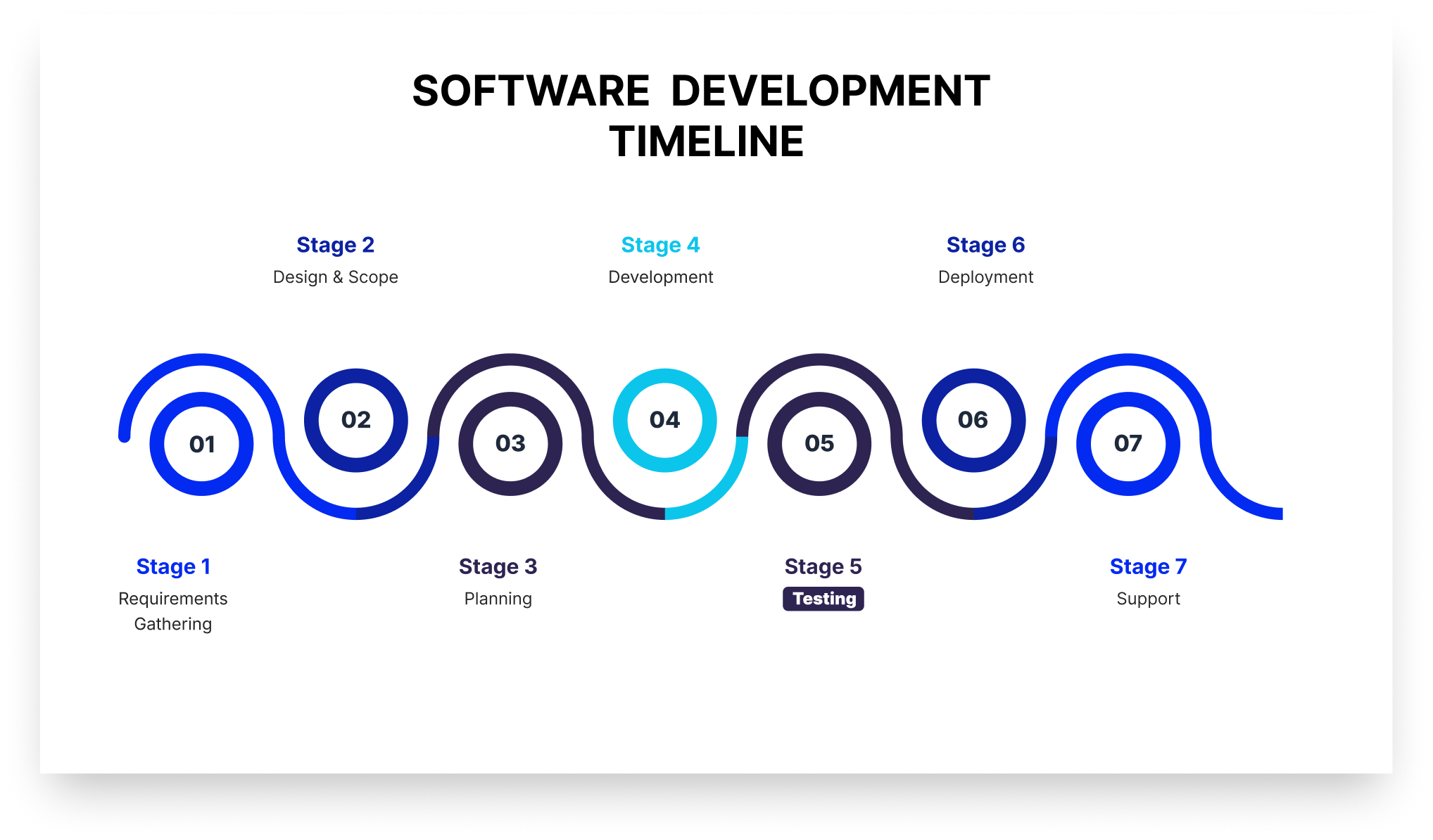
In the development chart, requirements sit on the left, production on the right, and testing has traditionally lived near the right edge (as visible in the picture below).

The software development timeline chart or the software development life cycle.

 “Shifting left” moves testing toward the beginning of that line, so it runs simultaneously with the other stages of the development process. 

A core benefit of shift-left testing is covers activities that prevent defects from being written at all. It reviews requirements for testability and defines acceptance criteria before a test is written. As a result, a defect caught in a requirements review never becomes code, saving time for developers. 

How Shift Left Testing Is Different From Traditional Testing

The difference between traditional testing and shift-left testing is not just about the tools you're using. It's more about how and when the QA will be involved in the product development. The table below shows the difference between shift-left testing and traditional testing in various aspects.

Traditional testing Shift left testing
When testing starts After development completes At requirements and design
Who owns quality The QA team Developers, QA, and security together
Feedback loop Days to weeks Minutes to hours
What triggers a test run A release candidate or handoff A commit or pull request
Defect discovery point Test phase or production Design, commit, or PR review
QA's primary role Finding defects Preventing them, plus deep exploratory work

The 4 Types of Shift Left Testing

Here are four common variants or types of shift-left testing that most agile teams follow:

1. Traditional Shift Left

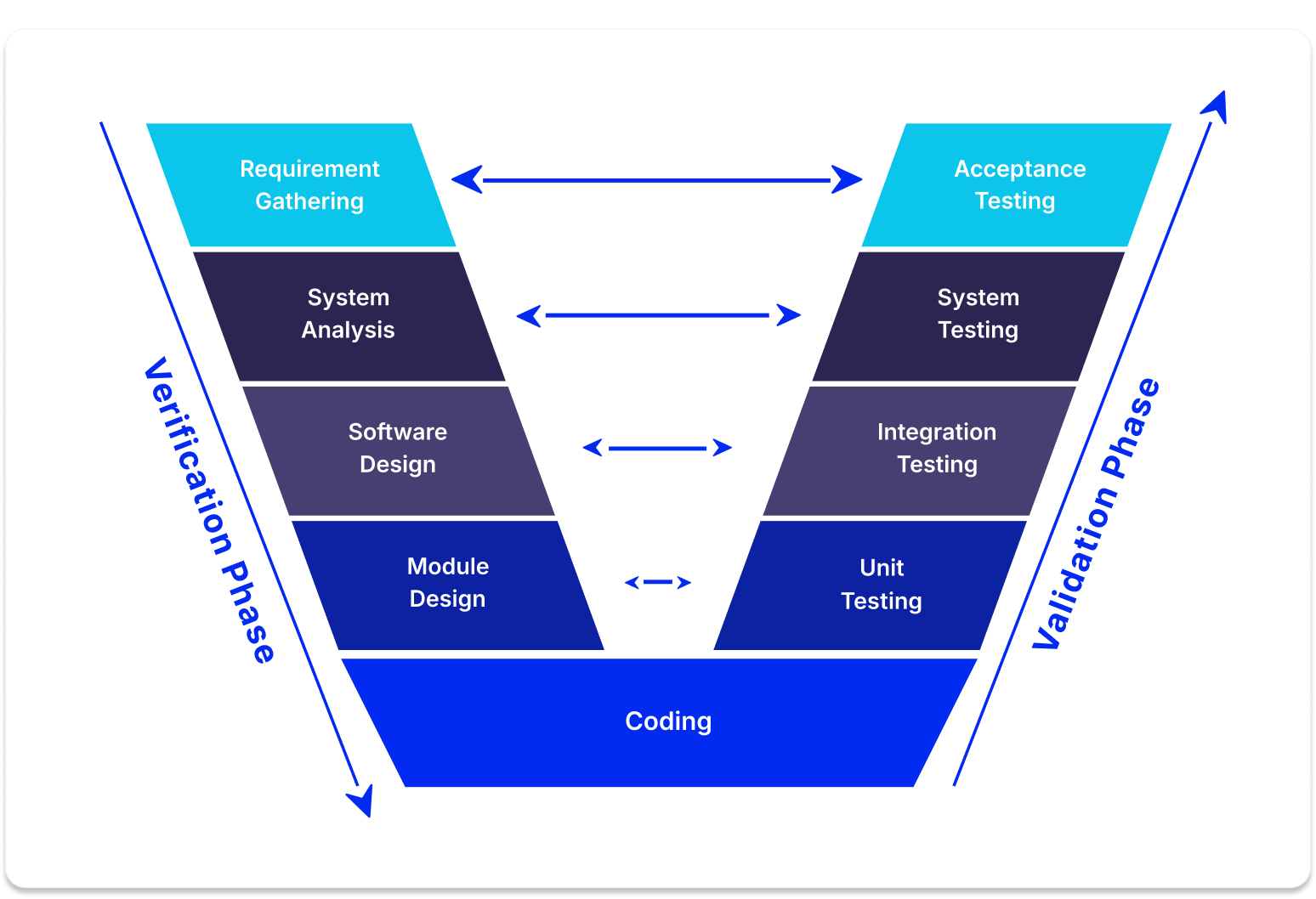
Traditional shift-left testing moves testing down and slightly left on the V model (see the image below). 

The V model in software testing

The V-Model is a step-by-step blueprint for building and testing software where every single development phase has a matching testing phase. It gets its name because the process bends upward after the coding stage, making the shape of the letter V.

It’s the type most people visualize when they talk about shift-left testing. For instance, if your team performs unit tests and integration tests early on, you’re doing traditional shift-left testing. 

2. Incremental Shift Left

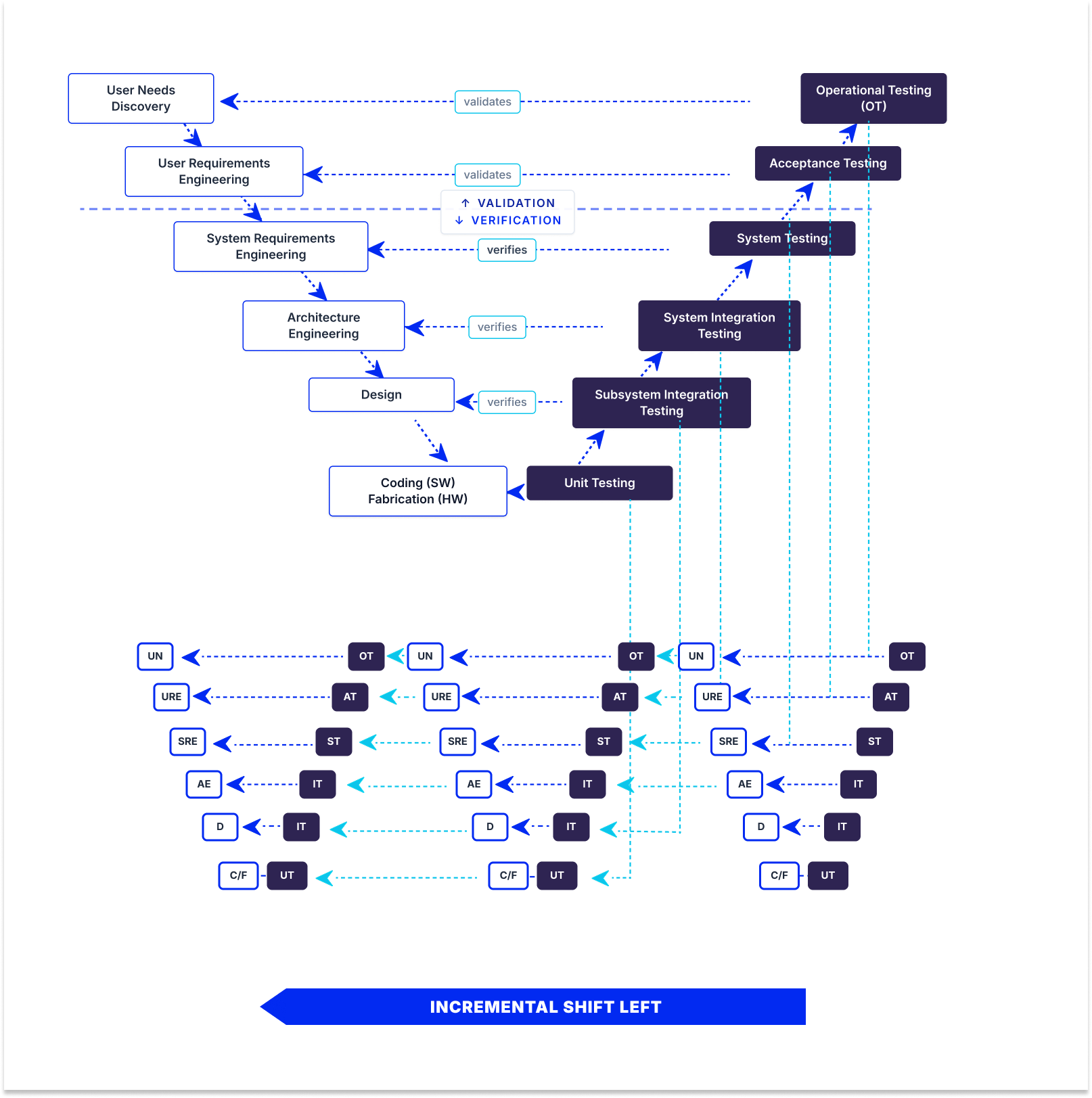
In incremental shift-left testing, the testing project breaks into smaller increments, each with its own V model (see the picture below). 

 Incremental shift-left testing where the V model breaks into smaller V models.

As a result, testing happens per increment rather than only once at the end. When each increment ships, developmental and operational testing shift left together. This is popular for large, complex systems with substantial hardware components, where you can’t test the whole system at once but can validate each subsystem as it’s built.

3. Agile/DevOps Shift Left

In Agile/DevOps shift-left testing, testing happens inside short sprints. Each sprint contains its own development and testing work. This means automated tests are triggered whenever there’s a code change in the CI/CD pipeline, so developers get the feedback the same day they change the code. 

4. Model-Based Shift Left

Model-based shift-left testing tests your model instead of code. It tests executable requirements, architecture, and design models, so testing begins almost immediately without waiting for code. The primary benefit of model-based shift-left testing is that you can catch requirements and expensive design defects. The catch is that model-based shift-left testing requires formal, executable models, which is why there is not a large adoption of this approach. 

Why DevOps Recommends Shift-Left Testing Principles

DevOps recommends shift-left testing principles for four reasons:

1. CI/CD pipelines require quality gates at every stage: A pipeline is a series of automated decisions about whether a change can proceed. If the only real check sits at the end, the pipeline isn’t deciding anything but only moving code toward one manual gate. Every stage needs its own criteria, including build, unit tests, static analysis, integration tests, and security scans.

2. Continuous deployment can’t wait for a manual QA cycle: If you deploy several times a day and your regression cycle takes three days, manual testing doesn’t work. If you stick to manual QA instead of automation, either deployment frequency drops to match testing or testing gets skipped. 

3. Shared quality ownership aligns with DevOps culture: DevOps dissolves the wall between development and operations. Leaving the “wall” of testing standing between development and QA reintroduces the same problem that DevOps tries to solve.

4. Faster feedback loops reduce context switching: A developer who gets a test failure immediately after pushing the change is still holding it fresh in their head, as opposed to someone who gets it later and has to find the context again.

How Does Automated Shift Left Testing Work

Automated shift-left testing relies on running fast and inexpensive checks early in the development process. It saves slow and expensive tests for later stages when code is more stable. 

The process starts at the pre-commit stage, where quick scans catch basic issues, such as formatting problems and leaked passwords. Next, when code is submitted for review, the system runs thorough unit tests and security checks within minutes. If anything fails at this review stage, the code cannot be merged into the main project. 

After merging, deeper integration checks and container scans run to ensure different parts of the system work together. Finally, comprehensive performance and end-to-end tests are run before the software is released to the public. Splitting tests into these distinct stages keeps the process fast so developers actually use it.

Mistakes to Avoid When Automating for Shift-Left Testing

When implementing automated shift-left testing, avoid these common pitfalls:

  • Writing tests after the fact: Tests written after code exists only confirm current behavior, including bugs, rather than validating requirements. Write tests from acceptance criteria to catch actual defects.
  • Slow test suites: Tests taking longer than 10 minutes force context switching as developers change tasks. Parallelize, stage tests, and trim low-value checks to keep runs fast.
  • Lack of ownership model: Clearly define who writes unit tests, maintains integration suites, and fixes broken pipelines. Without clear ownership, test suites decay and flaky tests get ignored.
  • Focusing on line coverage over defect escape rate: High line coverage does not guarantee meaningful assertions. Track the defect escape rate to measure true effectiveness.

Shift Left Testing Benefits

Adopting shift-left testing offers important organizational and operational benefits, including:

  • Lower defect cost: Bugs identified early in development are substantially cheaper and simpler to resolve than those discovered in production.
  • Faster release cycles: Continuous quality checks eliminate long stabilization periods prior to deployment.
  • Fewer production defects: Early checks catch architecture and requirements flaws before code reaches end users.
  • Shorter feedback loops: Developers address feedback immediately while context is still fresh.
  • Security cost reduction: Catching vulnerabilities during review avoids costly post-release incident response and patches.
  • Better collaboration: Early QA involvement fosters shared quality ownership across engineering teams.

Shift Left Testing Tools Worth Knowing in 2026

Effective shift-left testing relies on a modern toolkit tailored to every phase of the development lifecycle. Here are the top tools and frameworks essential for implementing shift-left testing in 2026:

Static Analysis and Secret Scanning

SonarQube: Analyzes source code for bugs and security vulnerabilities, enforcing quality gates directly on pull requests.

Semgrep: Lightweight static analysis using custom, code-like rules for fast feedback during development.

TruffleHog & Gitleaks: Scan repositories and commit histories via pre-commit hooks to catch secrets and API keys before they are pushed.

Unit and Integration Testing

JUnit, pytest & Jest: Essential unit testing frameworks for Java, Python, and JavaScript to build fast, automated test suites.

Testcontainers: Provides throwaway Docker instances for databases and services, removing shared-environment bottlenecks during integration tests.

API and Contract Testing

Postman & Newman: Enables teams to author API tests in a GUI and execute them automatically in CI/CD pipelines.

Pact: Facilitates consumer-driven contract testing to verify microservices independently without full deployments.

Dependency and Container Security

Snyk automatically scans third-party dependencies for vulnerabilities and opens automated pull requests for fixes.

Trivy: Fast open-source scanner for container images, filesystems, and infrastructure as code.

Trivy is an open-source scanner covering container images, filesystems, and infrastructure as code, fast enough to sit inside a build without slowing it down.

CI/CD Orchestration

GitHub Actions, GitLab CI & Jenkins: Automate and orchestrate pipeline stages, enforcing quality gates before code merges.

Shift Left vs. Shift Right Testing: What’s the Difference

Shift-left testing moves testing (left) earlier in the process, alongside or even before development. Shift-right testing moves testing (right) later into the process, into the production environment, with real data. 

The entire concept of shift-right testing is that some defects cannot be truly uncovered before real users hit real infrastructure, so it tests on actual traffic patterns, third-party behavior under load, and edge cases. 

TestFiesta Gives Your Shift Left Strategy Somewhere to Land

Shift-left testing aggregates results across multiple systems (CI unit tests, post-merge contract tests, PR security scans, and sprint exploratory sessions), often making release readiness difficult to track.

TestFiesta consolidates these sources into a single view by ingesting automated CI pipeline results alongside manual and exploratory test outcomes through its Automation API.

Reusable configurations allow test cases to execute across multiple browsers, devices, and environments without duplication, while shared steps centralize common workflows like login or checkout to streamline suite maintenance.

Built-in defect tracking connects failures directly to test executions. Integrations with Jira and GitHub automatically sync fields, update statuses, and create context-rich issues from failed runs.

Organizations use folders, tags, and custom fields to map automated run data. Pricing is a flat $10 per user per month with all features included.

Ready to Elevate Your Shift-Left Testing Strategy?

Streamline your quality workflow, centralize your test results, and empower your team to ship faster with confidence.

Start your free trial today

FAQs

Does shift-left testing mean developers replace QA engineers?

No, shift-left testing does not mean that developers replace QA engineers. It changes what QA spends time on. Repetitive testing is automated, and developers write tests alongside their code, while QA moves toward work that requires critical judgment, such as reviewing requirements for testability, designing test strategy, exploratory testing, and owning the quality signal. 

How do you measure whether shift-left testing is actually working?

To measure whether shift-left testing is actually working, you should track essential software testing metrics, including defect escape rate, the percentage of defects found in production rather than before release, mean time to detect, and pipeline duration, since a slow pipeline gets bypassed. 

What’s the difference between shift-left testing and test-driven development (TDD)?

Shift-left testing is a broad strategy that moves all quality activities, including requirements reviews, static analysis, and security scans, earlier in the development process. Test-driven development (TDD) is just one specific practice within that broader strategy, where you write a failing test before writing the code to pass it and refactor the results. Simply put, you can practice shift-left testing without using TDD, but you cannot do TDD without shifting left.

Tool

Pricing

TestFiesta

Free user accounts available; $10 per active user per month for teams

TestRail

Professional: $40 per seat per month

Enterprise: $76 per seat per month (billed annually)

Xray

Free trial; Standard: $10 per month for the first 10 users (price increases after 10 users)

Advanced: $12 per month for the first 10 users (price increases after 10 users)

Zephyr

Free trial; Standard: ~$10 per month for first 10 users (price increases after 10 users)

Advanced: ~$15 per month for the first 10 users (price increases after 10 users)

qTest

14‑day free trial; pricing requires demo & quote (no transparent pricing)

Qase

Free: $0/user/month (up to 3 users)

Startup: $24/user/month

Business: $30/user/month

Enterprise: custom pricing

TestMo

Team: $99/month for 10 users

Business: $329/month for 25 users

Enterprise: $549/month for 25 users

BrowserStack Test Management

Free plan available

Team: $149/month for 5 users

Team Pro: $249/month for 5 users

Team Ultimate: Contact sales

TestFLO

Annual subscription (specific amounts per user band), e.g., Up to 50 users: $1,186/yr; Up to 100 users: $2,767/yr; etc.

QA Touch

Free: $0 (very limited)

Startup: $5/user/month

Professional: $7/user/month

TestMonitor

Starter: $13/user/month

Professional: $20/user/month

Custom: custom pricing

Azure Test Plans

Pricing tied to Azure DevOps services (no specific rate given)

QMetry

14‑day free trial; custom quote pricing

PractiTest

Team: $54/user/month (minimum 5 users)

Corporate: custom pricing

Black Box Testing

White Box Testing

Coding Knowledge

No code knowledge needed

Requires understanding of code and internal structure

Focus

QA testers, end users, domain experts

Developers, technical testers

Performed By

High-level and strategic, outlining approach and objectives.

Detailed and specific, providing step-by-step instructions for execution.

Coverage

Functional coverage based on requirements

Code coverage

Defects type found

Functional issues, usability problems, interface defects

Logic errors, code inefficiencies, security vulnerabilities

Limitations

Cannot test internal logic or code paths

Time-consuming, requires technical expertise

Aspect

Test Plan

Test Case

Purpose

Defines the overall testing strategy, scope, and approach for a project or release.

Validates that a specific feature or functionality works as expected.

Scope

Covers the entire testing effort, including what will be tested, resources, timelines, and risks.

Focuses on a single scenario or functionality in the broader scope.

Level of Detail

High-level and strategic, outlining approach and objectives.

Detailed and specific, providing step-by-step instructions for execution.

Audience

Project managers, stakeholders, QA leads, and development teams.

QA testers and engineers.

When It's Created

Early in the project, before testing begins.

After the test plan is defined and the requirements are clear.

Content

Scope, objectives, strategy, resources, schedule, environment details, and risk management.

Test case ID, title, preconditions, test steps, expected results, and test data.

Frequency of Updates

Updated periodically as project scope or strategy changes.

Updated frequently as features change or bugs are fixed.

Outcome

Provides direction and clarifies what to test and how to approach it.

Produces pass or fail results that indicate whether specific functionality works correctly.

Tool

Key Highlights

Automation Support

Team Size

Pricing

Ideal For

TestFiesta

Flexible workflows, tags, custom fields, and AI copilot

Yes (integrations + API)

Small → Large

Free solo; $10/active user/mo

Flexible QA teams, budget‑friendly

TestRail

Structured test plans, strong analytics

Yes (wide integrations)

Mid → Large

~$40–$74/user/mo)

Medium/large QA teams

Xray

Jira‑native, manual/
automated/
BDD

Yes (CI/CD + Jira)

Small → Large

Starts ~$10/mo for 10 Jira users

Jira‑centric QA teams

Zephyr

Jira test execution & tracking

Yes

Small → Large

~$10/user/mo (Squad)

Agile Jira teams

qTest

Enterprise analytics, traceability

Yes (40+ integrations)

Mid → Large

Custom pricing

Large/distributed QA

Qase

Clean UI, automation integrations

Yes

Small → Mid

Free up to 3 users; ~$24/user/mo

Small–mid QA teams

TestMo

Unified manual + automated tests

Yes

Small → Mid

~$99/mo for 10 users

Agile cross‑functional QA

BrowserStack Test Management

AI test generation + reporting

Yes

Small → Enterprise

Free tier; starts ~$149/mo/5 users

Teams with automation + real device testing

TestFLO

Jira add‑on test planning

Yes (via Jira)

Mid → Large

Annual subscription starts at $1,100

Jira & enterprise teams

QA Touch

Built‑in bug tracking

Yes

Small → Mid

~$5–$7/user/mo

Budget-conscious teams

TestMonitor

Simple test/run management

Yes

Small → Mid

~$13–$20/user/mo

Basic QA teams

Azure Test Plans

Manual & exploratory testing

Yes (Azure DevOps)

Mid → Large

Depends on the Azure DevOps plan

Microsoft ecosystem teams

QMetry

Advanced traceability & compliance

Yes

Mid → Large

Not transparent (quote)

Large regulated QA

PractiTest

End‑to‑end traceability + dashboards

Yes

Mid → Large

~$54+/user/mo

Visibility & control focused QA

Related Articles

Introduction

Accessibility testing checks whether people with disabilities can use your website or app without barriers. This includes users who are blind or low-vision, deaf or hard of hearing, keyboard-only navigators, and those with cognitive or learning disabilities.

While most teams value accessibility, many struggle to define what to test, select the right tools, or maintain checks in their release workflow. This guide covers the essential standards of accessibility testing, a three-layer testing methodology, key web and mobile differences, top tools, and answers to common team questions.

What Is Accessibility Testing

Accessibility testing is the process of checking that a digital product works for everyone, including people who rely on assistive technology or use their devices in different ways. It asks simple questions, such as:

  • Can someone reach every button using only a keyboard? 
  • Does a screen reader announce what an image shows? 
  • Is the text readable against its background? 
  • Can someone who can’t hear follow a video?

Accessibility testing is continuous, and it works best when it runs alongside the rest of your QA process.

Why Accessibility Testing Matters

There are three good reasons to take accessibility testing seriously:

  • More people can use your product: Disabilities are common, and many more people deal with temporary or situational limits, like a broken arm, bright sunlight on a screen, or a noisy room.
  • Legal risk goes down: Many countries have laws that require digital products to be accessible, and most of them point to the same set of guidelines.
  • Quality goes up: Clear labels, logical structure, and good contrast make a product easier for everyone, not just users with disabilities.

What Are Web Content Accessibility Guidelines (WCAG)?

The Web Content Accessibility Guidelines, or WCAG, are the global standard for digital accessibility. They’re published by the World Wide Web Consortium (W3C), and most accessibility laws and audits measure products against them. 

WCAG is built on four principles, often shortened to POUR:

  • Perceivable: Users can see or hear the content. Images have text alternatives, videos have captions, and text has enough contrast.
  • Operable: Users can use every control, whether they navigate with a mouse, keyboard, or voice.
  • Understandable: Content and behavior are clear and predictable. Forms explain errors, and navigation stays consistent.
  • Robust: Content works with a wide range of browsers and assistive technologies.

Under these principles sit testable rules called success criteria. Each one has a conformance level:

Level A (Minimum Compliance): Establishes the essential baseline for web accessibility. It addresses fundamental barriers that would otherwise prevent users with disabilities from accessing or interacting with content entirely (e.g., providing alt text for images, basic keyboard navigation, and avoiding content that causes seizures).

Level AA (Standard Compliance): Serves as the widely accepted global benchmark for web accessibility and legal compliance. It removes significant barriers for a broader population of users with diverse visual, hearing, cognitive, and motor impairments (e.g., ensuring adequate text contrast, visible focus states, consistent navigation, and clear error handling).

Level AAA (Enhanced Compliance): Represents the highest and most stringent level of accessibility. It incorporates specialized criteria designed to optimize usability for users with specific or severe disabilities (e.g., providing sign language interpretation for audio, extended color contrast ratios, and simplified reading levels). Note that full Level AAA compliance across an entire site is generally not required or feasible for all content types.

The Accessibility Testing Tools Worth Knowing

Instead of using dozens of accessibility tools and cluttering your QA process, focus on a core set that covers each layer of testing. Most QA teams rely on the following essentials.

axe DevTools: Scans pages for WCAG issues and explains how to fix each one.

WAVE: Places icons directly on the page to show errors, alerts, and structure. 

Google Lighthouse: Gives each page an accessibility score and a list of issues. 

Pa11y: Command-line tool that runs accessibility checks on any URL. 

Accessibility Scanner (Android): A free app that scans any screen on an Android device and suggests fixes for issues.

Xcode Accessibility Inspector (iOS): A tool that comes with Xcode and lets you inspect the accessibility details of each element in an iOS app.

Learn more about accessibility testing tools.

TestFiesta Keeps Your Accessibility Testing From Falling Through the Cracks

Accessibility testing often fails due to fragmented workflows: automated scans stay in CI/CD, manual logs remain in personal notes, and screen reader findings get lost in chat. TestFiesta unifies all three testing layers into a single platform.

  • Reusable Test Cases: Convert keyboard, zoom, and screen reader checks into standardized test cases with reusable steps for repeated actions.
  • Test Execution and Tracking: Schedule accessibility passes per release to monitor pass/fail status and test coverage in real time.
  • Defect Management: File accessibility defects directly from test runs and sync them to Jira or GitHub with full contextual details.
  • AI Test Case Generation: Automatically generate accessibility test cases from requirements, user stories, or UI screenshots.
  • CI/CD Integration: Import automated test results via the TacoTruck CLI alongside manual testing reports.

Accessibility shouldn’t be an afterthought or a chaotic scramble before release. Take control of your accessibility testing with TestFiesta.

Start a free trial today

FAQs

How is accessibility testing different from usability testing?

Usability testing checks whether a product is easy and pleasant to use for a general group of users. Accessibility testing checks whether people with disabilities can use it at all, often against WCAG criteria. 

Is accessibility testing different from user acceptance testing?

Yes, User acceptance testing (UAT) confirms that a product meets business requirements before release, usually with end users or stakeholders. Accessibility testing focuses on whether people with disabilities can use the product. 

Which WCAG level should my team be targeting, A, AA, or AAA?

Most teams should target WCAG 2.2 Level AA. It’s the level most laws and contracts ask for, and it covers the barriers users hit most often. 

Can I pass an accessibility audit using only automated tools?

No, automated tools only catch part of the WCAG criteria, and they can’t judge things like whether alt text makes sense or whether a screen reader user can complete a task. Auditors test manually and with assistive technology, so you should too.
Testing guide
Best practices

Introduction

Large language models are now a part of core enterprise infrastructure, which is why it’s critical to ensure they are safe, accurate, and high-performing at scale. 

Traditional software testing methods fall short in this landscape. As a result, QA teams are required to adopt entirely new frameworks, metrics, and red-teaming strategies to build truly production-ready AI applications.

What Is LLM Testing

LLM testing is the process of evaluating a large language model or LLM-powered application against defined expectations for quality, safety, performance, and security. In practice, most QA teams are not testing a foundation model from scratch. They are testing what sits on top of it, such as prompts, retrieval pipelines, tool calls, guardrails, and business logic that turn a general model into a product. That distinction shapes the work. 

A chatbot that answers billing questions needs to pull the right account policy, stay on topic, refuse requests it should not fulfill, and respond fast enough that customers don’t give up on it. In this case, each function a chatbot performs is a testable behavior.

LLM testing usually combines three kinds of checks:

  1. Deterministic assertions for anything with a clear right answer, such as valid JSON, required fields, or a banned phrase never appearing.
  2. Model-graded evaluation, where a second model scores outputs against a rubric. This is often called LLM-as-a-judge.
  3. Human review for judgment calls that automated scoring still gets wrong.

The result of LLM testing is a measured picture of how often the system behaves as intended, and whether it improves or degrades with each change.

The 4 Main Types of LLM Testing

Most LLM test plans fall into four categories, each targeting a different risk. A production-ready application needs coverage in all four. 

1. Functional Testing

Functional testing checks whether the application does its job, like answering correctly, following instructions, and producing output in the expected format.

Typical test cases cover:

  • Task accuracy: Does the summary capture the key points? Does the extraction pull the right fields?
  • Instruction following: Does the model respect length limits, tone requirements, and output schemas?
  • Retrieval quality: In RAG systems, did the pipeline fetch the right documents, and did the answer actually use them?
  • Multi-turn behavior: Does the assistant keep track of context from earlier in the conversation?
  • Tool and agent behavior: Did the agent call the right tool, with valid arguments, in a sensible order?

Build functional tests from real user scenarios rather than generic prompts. A test set drawn from actual support tickets or product requirements catches far more than one built from templated questions. Every bug a user reports should also become a permanent regression case.

2. Performance and Reliability Testing

Performance testing measures how fast and how consistently the application responds under realistic load. LLM latency behaves differently from typical API latency because responses stream token by token and output length varies with every request.

Key areas to cover:

  • Latency: Time to first token, total response time, and tokens per second.
  • Load behavior: How latency and error rates change as concurrent users grow, and where provider rate limits kick in.
  • Consistency: Whether the same prompt produces stable quality across repeated runs.
  • Failure handling: Timeouts, provider outages, truncated responses, malformed output, and whether retries and fallbacks work.
  • Cost: Token usage per request, since a prompt change that doubles output length also doubles spend.

Reliability is where non-determinism hurts most. Run each critical test case several times and track the spread, not just the average. A feature that answers correctly 9 times out of 10 still fails visibly for a share of real users.

3. Safety and Content Testing

Safety testing checks whether the application produces harmful, biased, or off-policy output, including when users are not trying to break it.

Coverage usually includes:

  • Toxicity and harmful content: Hate speech, harassment, and violent or sexual content.
  • Bias: Whether answers or tone shift based on names, genders, or other demographic cues in the prompt.
  • Policy compliance: Staying within brand guidelines and avoiding medical, legal, or financial advice where the product shouldn't give it.
  • Refusal calibration: Refusing what it should without over-refusing legitimate requests.
  • Privacy: Not repeating personal data from context or logs in its responses.

Over-refusal deserves its own test cases. A model that declines half of valid customer questions passes every safety check and still fails the product. Track refusal rate and harmful output rate together.

4. LLM Penetration Testing

LLM penetration testing attacks the application the way a malicious user would. Safety testing asks whether the model says something harmful, whereas penetration testing asks whether an attacker can make the system do something it was never meant to do.

Common attack categories to test:

  • Direct prompt injection: Inputs that try to override system instructions, such as “ignore previous instructions and…”
  • Indirect prompt injection: Malicious instructions hidden in content the model reads, like a web page, uploaded file, or document in a RAG index.
  • System prompt leakage: Attempts to extract hidden instructions, internal rules, or credentials placed in prompts.
  • Sensitive data disclosure: Getting the model to reveal other users’ data or internal documents from its context.
  • Excessive agency: Tricking an agent into calling tools, sending messages, or changing data beyond what the user is authorized to do.
  • Insecure output handling: Model output passed unchecked into a browser, database query, or shell.
  • Resource abuse: Prompts designed to max out tokens, loop agents, or run up costs.

When a model can take actions, a successful injection can send emails, modify records, or expose data. Pair automated attack generation with manual testing, and retest after every prompt or tool change.

LLM Testing Frameworks and Tools Worth Knowing

No single tool covers every type of LLM testing. Most teams pair an evaluation framework for functional and RAG metrics with a dedicated tool for security scanning. 

1. DeepEval

DeepEval is a Python LLM testing framework (Apache 2.0) integrated with Pytest. It provides metrics for RAG quality, agent behavior, conversation context, toxicity, custom evaluation, and synthetic dataset generation for CI/CD integration.

Best for: Teams that want LLM tests to live alongside their existing Python test suite.

2. Promptfoo

Promptfoo is a CLI tool and library (MIT) for declarative evaluation and red-teaming. It compares prompts and models across providers and generates adversarial tests for prompt injection, jailbreaks, and data exfiltration.

Best for: Prompt and model comparisons, and automated LLM penetration testing.

3. Giskard

Giskard is an open-source Python library (Apache 2.0) that automatically detects hallucinations, prompt injection, and bias. Its RAGET module generates test cases to evaluate retriever and generator performance separately.

Best for: Surfacing vulnerabilities you don’t typically test for, especially in RAG applications.

4. TruLens

TruLens (MIT) pairs OpenTelemetry tracing with model evaluations to measure latency, token usage, cost, and the RAG triad (context relevance, groundedness, and answer relevance).

Best for: Pinpointing where in a multi-step pipeline quality breaks down, and comparing app versions on quality, latency, and cost.

5. Ragas

Ragas (Apache 2.0) evaluates retrieval-augmented generation systems through faithfulness, answer relevancy, context precision, and recall metrics, alongside synthetic test dataset generation.

Best for: RAG evaluation and teams that need to build a test set from scratch.

Key LLM Testing Metrics

LLM testing differs from usual software testing metrics. Most quality metrics in LLM testing score from 0 to 1, and your team sets the threshold that counts as a pass.

1. Faithfulness

Faithfulness measures whether the claims in an answer are supported by the context the model was given. It is usually calculated by breaking the answer into individual statements and checking each one against the retrieved documents. A low score means the model is adding information its sources don't contain.

2. Answer Relevance

Answer relevance measures how directly a response addresses the question asked. An answer can be accurate and faithful but still miss the point, filling space with related facts instead of answering. This metric catches that.

3. Hallucination Rate

Hallucination rate is the share of outputs that contain fabricated or unsupported information. Faithfulness scores a single response, while hallucination rate is tracked across a full test set, so you can see whether a model or prompt change made the problem better or worse.

4. Toxicity Score

A toxicity score estimates how likely an output is to be offensive, abusive, or harmful, usually using a classifier or judge model. Track the share of responses above your threshold rather than the average score. One toxic reply matters more than a low mean.

5. Groundedness

Groundedness measures how well each statement in a response can be traced back to a provided source. It overlaps heavily with faithfulness, and frameworks define the two terms differently. Check how your tool calculates each before comparing numbers across tools.

6. Latency / TTFT (Time to First Token)

Time to first token is the delay between sending a request and receiving the first token of the response. It drives how fast a streaming interface feels. Track it alongside total response time and tokens per second, and report percentiles such as p95 instead of averages, because slow outliers are what users notice.

7. Pass@k

Pass@k is the probability that at least one of k generated attempts passes a test. It comes from code generation, where a task counts as solved if any of k samples passes its unit tests. For user-facing features, the stricter question is often whether all k attempts pass, since users see one response, not the best of several.

TestFiesta Was Built for the Complexity LLM Testing Brings

LLM testing creates a lot of moving parts, including functional, safety, and security test cases, results from automated eval runs, scores that shift with every prompt or model change, and defects that need a clear trail back to the input that caused them. TestFiesta gives QA teams one place to manage all of it.

  • AI Copilot for Test Design: Upload requirements, user stories, or screenshots, and the Copilot generates structured test cases from that context. Nothing enters your suite until you review and approve it, which matters when you are writing hundreds of prompt scenarios and adversarial cases.
  • Flexible Organization: Reusable templates, universal tagging, and shared steps let you group cases by test type, risk, or feature, so a safety suite or red-team suite can run on its own.
  • Reusable Configurations: Run the same test cases across environments, or treat model and prompt versions as configurations to track results per version.
  • Automated Results in One Place: The TacoTruck CLI and full API access push results from CI/CD runs into TestFiesta, so eval framework output sits next to manual and exploratory testing.
  • Built-In Bug Tracking: Log defects in the same platform where you manage test cases, or turn a failed test into a Jira or GitHub issue with full context attached.

Set up your first LLM test suite in TestFiesta and get a QA workflow that fits your team.

Start your free trial today

FAQs

Can LLM testing be automated?

Yes, LLM testing can be largely automated. Deterministic checks, model-graded metrics, and adversarial attack generation can all run in a CI/CD pipeline on every prompt, model, or code change. That said, automation can’t fully replace human review of judgment-heavy outputs, or periodic checks that judge whether models are scoring accurately. 

What is LLM red teaming?

LLM red teaming is adversarial testing where testers deliberately try to make a model or application misbehave through jailbreaks, prompt injection, data extraction, or harmful content requests. It overlaps with LLM penetration testing but is usually broader, covering safety and misuse as well as security flaws. 

How do I test an LLM when I don’t have a ground truth dataset?

You can still test an LLM if you don’t have a ground truth dataset. Start with reference-free metrics such as faithfulness, answer relevance, and groundedness, which score outputs against the question and retrieved context instead of an expected answer. You can also generate a synthetic test set from your own documents and have domain experts review a sample. Over time, real user queries from production, labeled as you go, become your ground truth dataset.

Testing guide
Best practices

Introduction

How do you verify whether the system output is actually correct when nobody knows what the exact expected answer should be?

In software engineering, this challenge is known as the oracle problem; a bottleneck where traditional unit tests and pass/fail assertions hit a wall. When checking single outputs against fixed expected values is impossible or too expensive, metamorphic testing offers a powerful alternative: instead of checking whether a single output is correct on its own, you check how outputs relate across logical transformations of the input.

What Is Metamorphic Testing

Metamorphic testing is a way to test software without knowing the exact correct output for any single input. Instead of checking one result against an expected value, you run the program more than once with related inputs. Then you check that the outputs relate to each other the way they logically should.

Here is a simple illustration:

Say you are testing a payroll function. You may not know the exact total for a 400-person company with overtime, bonuses, and tax rules. But you do know one thing for sure: If every employee’s hourly rate doubles and nothing else changes, gross payroll should double too. Run both versions, compare, and if the second total isn’t twice the first, you can determine that the output is wrong. As a result, you found a problem without ever knowing the “right” answer.

Metamorphic testing has two main strengths:

  • It eases the oracle problem: You verify relationships between outputs, not the correctness of each output on its own.
  • It generates new tests: Every existing test case can spawn follow-up cases, so coverage grows from tests you already have.

What Is a Metamorphic Relation

A metamorphic relation (MR) is the rule that ties metamorphic test runs together. It states how a specific change to the input should affect the output. If the outputs break the rule, the program has a fault somewhere.

Every MR has two parts. One is the input transformation, which is how you change the original input to create a new one. The other is the output relation, which is what must hold between the original output and the new output.

Imagine you are testing a function that sorts a list of numbers. For a short list, you can check the result by looking at it. But for a list of 100,000 numbers, you need a function. When testing complex functions like sorting a massive list of numbers where you cannot manually verify every expected output, you can still rely on fundamental rules or properties that must always remain true. Each of these inherent properties serves as a Metamorphic Relation (MR) that can be used to catch software bugs without needing to know the exact final answer in advance.

In this specific case, the MRs would be:

MR 1: Shuffling the input should not change the output. If list B contains exactly the same numbers as list A in a different order, then sort(B) must equal sort(A). If they differ, the function is mishandling order somewhere.

MR 2: Adding a larger number should only extend the output. If you append a value bigger than everything in list A, the sorted result should be the original sorted list with that value at the end. Anything else means the new element disturbed items it never should have touched.

Neither rule tells you what the sorted list should look like. But both can still catch real bugs. Mathematical functions work the same way. You may not know sin(x) to fifteen decimal places, but you know sin(x) and sin(π − x) must be equal.

How Metamorphic Testing Works: A Step-by-Step Guide

Metamorphic testing follows the five steps, which remain the same regardless of testing a sort function or a self-driving model. 

To make it simple, we’ll use the e-commerce search example.

Step 1: Identify metamorphic relations: Study what the system is supposed to do and write down properties that must hold across related inputs, like “adding a filter never adds results.” This step takes the most thought and depends on domain knowledge, so pull in the people who understand the system best.

Step 2: Create source test cases. Choose the original inputs the process starts from, such as a set of real search queries. These can be existing test cases, randomly generated inputs, or anonymized production data.

Step 3: Derive follow-up test cases. Apply each MR’s input transformation to every source case, such as by adding a size filter to each query. One source case can feed several MRs, so a small seed set grows quickly.

Step 4: Execute both sets. Run the program on the source inputs and the follow-up inputs, then record every output. Keep each follow-up paired with its source so you always know which results to compare.

Step 5: Verify the relation. Check whether each pair of outputs satisfies the output relation, such as “filtered results are a subset of unfiltered results.” A violation means at least one output is wrong, which signals a bug in the program or a flaw in the MR itself.

A Pro Tip: A passing metamorphic test does not prove the program is correct. A function could break in a way that still satisfies a given relation. That is why teams usually define several MRs per feature, each checking the behavior from a different angle.

Where Metamorphic Testing Matters

Metamorphic testing matters wherever expected outputs are unknown, expensive to compute, or open to interpretation. These five areas are where it shows up most include:

Scientific and mathematical software

  • Simulations and numerical programs that often have no known exact answer to compare against.
  • Mathematical properties like symmetry, scaling, and conservation laws.
  • Published studies have applied it to bioinformatics programs, epidemiological models, and software at NASA.

Machine learning and AI models

  • Models that produce outputs that no one can fully specify in advance, which is the oracle problem in its purest form.
  • Machine learning models where output should remain consistent or stable when minor, non-essential changes are made to the input. In this context, if you slightly darken a photo, an image classifier should still recognize the same object, because a minor change in lighting doesn’t change the underlying subject of the image.
  • Large language models where rephrasing a factual question should not change the factual answer.

Search engines and ranking systems

  • Systems where there is no objective, agreed-upon “correct” result set for most queries.
  • Subset and consistency relations, like the filtering examples.

Compilers and code translation tools

  • Tools where verifying the compiled output for every possible program is out of reach.
  • Translation tools where two programs that behave the same on a given input should still behave the same after compilation.

Web APIs

  • API responses that often depend on live, constantly changing data, so exact expected values are hard to pin down.

How TestFiesta Helps With Test Case Management for Metamorphic Testing

Metamorphic testing multiplies your test cases fast. Five MRs applied to 40 source cases give you 200 follow-up cases, and every one of them needs to stay linked to its source, its relation, and its result. Without structure, that turns into a cluttered dashboard or spreadsheet.

TestFiesta keeps everything around them organized and traceable.

  • Customizable Tags: TestFiesta offers unlimited customizable tags for grouping, filtering, and sorting test cases. Tag each case with its MR and its role as a source or follow-up case. When an MR starts failing, you can filter straight to every related case.
  • Custom Fields: Custom fields capture data at the test case, run, or result level. Use them to record the input transformation, the expected output relation, and the ID of the source case each follow-up came from.
  • Reusable Templates: Build one MR template with fields for the transformation and the relation. Every new MR then gets documented the same way, no matter who on the team writes it.
  • Shared Steps: Source and follow-up cases usually share setup, like loading a dataset or authenticating against an API. Write those steps once and reuse them everywhere, so a change in setup updates every case at once.
  • Configurations: Configurations let you reuse one test case across many setups. Run the same MR against different environments, browsers, or model versions without cloning cases.
  • Jira and GitHub Integrations: When a relation is violated, turn the failed test into a Jira or GitHub issue with full context, or log bugs natively in TestFiesta. Developers see both inputs and both outputs, which is exactly what they need to debug a metamorphic failure.
  • An API for Automated Results: Metamorphic tests are usually automated, and TestFiesta’s Automation API supports custom automations, so results from your test runs can flow into the platform instead of being copied by hand.

Don’t let the complexity of managing metamorphic relations and automated test suites slow down your release cycles.

Start your free trial today

FAQs

Can metamorphic testing be automated?

Yes, metamorphic testing can be automated, and it is well-suited to automation. Once your MRs are defined, generating follow-up inputs, running both sets, and checking the relations can all be scripted. 

What tools do I need for metamorphic testing?

You don’t need a dedicated tool for metamorphic testing. Most teams write MRs as ordinary tests in the framework they already use, such as pytest or JUnit, and property-based testing libraries like Hypothesis can help generate source inputs. A test case management platform keeps your MRs, source cases, follow-ups, and results connected as the suite grows.

Do I need to know the correct output to write metamorphic tests?

No, you don’t need to know the correct output to write metamorphic tests. That’s the entire point of metamorphic testing. You only need to know how outputs should relate to each other when the input changes in a specific way. Writing good relations still takes domain knowledge, but you never need the exact expected value for any single input.

Testing guide

Ready for a Platform that Works

The Way You Do?

Stop fighting your tools. Start shipping with confidence. TestFiesta adapts to your workflow, not the other way around.

Welcome to the fiesta!