
All Articles

Ah. Nothing to see here… yet

It may be coming soon, but for now, try refining your search

Thank you! Your submission has been received!
Oops! Something went wrong while submitting the form.

Introduction

How do you verify whether the system output is actually correct when nobody knows what the exact expected answer should be?

In software engineering, this challenge is known as the oracle problem; a bottleneck where traditional unit tests and pass/fail assertions hit a wall. When checking single outputs against fixed expected values is impossible or too expensive, metamorphic testing offers a powerful alternative: instead of checking whether a single output is correct on its own, you check how outputs relate across logical transformations of the input.

What Is Metamorphic Testing

Metamorphic testing is a way to test software without knowing the exact correct output for any single input. Instead of checking one result against an expected value, you run the program more than once with related inputs. Then you check that the outputs relate to each other the way they logically should.

Here is a simple illustration:

Say you are testing a payroll function. You may not know the exact total for a 400-person company with overtime, bonuses, and tax rules. But you do know one thing for sure: If every employee’s hourly rate doubles and nothing else changes, gross payroll should double too. Run both versions, compare, and if the second total isn’t twice the first, you can determine that the output is wrong. As a result, you found a problem without ever knowing the “right” answer.

Metamorphic testing has two main strengths:

  • It eases the oracle problem: You verify relationships between outputs, not the correctness of each output on its own.
  • It generates new tests: Every existing test case can spawn follow-up cases, so coverage grows from tests you already have.

What Is a Metamorphic Relation

A metamorphic relation (MR) is the rule that ties metamorphic test runs together. It states how a specific change to the input should affect the output. If the outputs break the rule, the program has a fault somewhere.

Every MR has two parts. One is the input transformation, which is how you change the original input to create a new one. The other is the output relation, which is what must hold between the original output and the new output.

Imagine you are testing a function that sorts a list of numbers. For a short list, you can check the result by looking at it. But for a list of 100,000 numbers, you need a function. When testing complex functions like sorting a massive list of numbers where you cannot manually verify every expected output, you can still rely on fundamental rules or properties that must always remain true. Each of these inherent properties serves as a Metamorphic Relation (MR) that can be used to catch software bugs without needing to know the exact final answer in advance.

In this specific case, the MRs would be:

MR 1: Shuffling the input should not change the output. If list B contains exactly the same numbers as list A in a different order, then sort(B) must equal sort(A). If they differ, the function is mishandling order somewhere.

MR 2: Adding a larger number should only extend the output. If you append a value bigger than everything in list A, the sorted result should be the original sorted list with that value at the end. Anything else means the new element disturbed items it never should have touched.

Neither rule tells you what the sorted list should look like. But both can still catch real bugs. Mathematical functions work the same way. You may not know sin(x) to fifteen decimal places, but you know sin(x) and sin(π − x) must be equal.

How Metamorphic Testing Works: A Step-by-Step Guide

Metamorphic testing follows the five steps, which remain the same regardless of testing a sort function or a self-driving model. 

To make it simple, we’ll use the e-commerce search example.

Step 1: Identify metamorphic relations: Study what the system is supposed to do and write down properties that must hold across related inputs, like “adding a filter never adds results.” This step takes the most thought and depends on domain knowledge, so pull in the people who understand the system best.

Step 2: Create source test cases. Choose the original inputs the process starts from, such as a set of real search queries. These can be existing test cases, randomly generated inputs, or anonymized production data.

Step 3: Derive follow-up test cases. Apply each MR’s input transformation to every source case, such as by adding a size filter to each query. One source case can feed several MRs, so a small seed set grows quickly.

Step 4: Execute both sets. Run the program on the source inputs and the follow-up inputs, then record every output. Keep each follow-up paired with its source so you always know which results to compare.

Step 5: Verify the relation. Check whether each pair of outputs satisfies the output relation, such as “filtered results are a subset of unfiltered results.” A violation means at least one output is wrong, which signals a bug in the program or a flaw in the MR itself.

A Pro Tip: A passing metamorphic test does not prove the program is correct. A function could break in a way that still satisfies a given relation. That is why teams usually define several MRs per feature, each checking the behavior from a different angle.

Where Metamorphic Testing Matters

Metamorphic testing matters wherever expected outputs are unknown, expensive to compute, or open to interpretation. These five areas are where it shows up most include:

Scientific and mathematical software

  • Simulations and numerical programs that often have no known exact answer to compare against.
  • Mathematical properties like symmetry, scaling, and conservation laws.
  • Published studies have applied it to bioinformatics programs, epidemiological models, and software at NASA.

Machine learning and AI models

  • Models that produce outputs that no one can fully specify in advance, which is the oracle problem in its purest form.
  • Machine learning models where output should remain consistent or stable when minor, non-essential changes are made to the input. In this context, if you slightly darken a photo, an image classifier should still recognize the same object, because a minor change in lighting doesn’t change the underlying subject of the image.
  • Large language models where rephrasing a factual question should not change the factual answer.

Search engines and ranking systems

  • Systems where there is no objective, agreed-upon “correct” result set for most queries.
  • Subset and consistency relations, like the filtering examples.

Compilers and code translation tools

  • Tools where verifying the compiled output for every possible program is out of reach.
  • Translation tools where two programs that behave the same on a given input should still behave the same after compilation.

Web APIs

  • API responses that often depend on live, constantly changing data, so exact expected values are hard to pin down.

How TestFiesta Helps With Test Case Management for Metamorphic Testing

Metamorphic testing multiplies your test cases fast. Five MRs applied to 40 source cases give you 200 follow-up cases, and every one of them needs to stay linked to its source, its relation, and its result. Without structure, that turns into a cluttered dashboard or spreadsheet.

TestFiesta keeps everything around them organized and traceable.

  • Customizable Tags: TestFiesta offers unlimited customizable tags for grouping, filtering, and sorting test cases. Tag each case with its MR and its role as a source or follow-up case. When an MR starts failing, you can filter straight to every related case.
  • Custom Fields: Custom fields capture data at the test case, run, or result level. Use them to record the input transformation, the expected output relation, and the ID of the source case each follow-up came from.
  • Reusable Templates: Build one MR template with fields for the transformation and the relation. Every new MR then gets documented the same way, no matter who on the team writes it.
  • Shared Steps: Source and follow-up cases usually share setup, like loading a dataset or authenticating against an API. Write those steps once and reuse them everywhere, so a change in setup updates every case at once.
  • Configurations: Configurations let you reuse one test case across many setups. Run the same MR against different environments, browsers, or model versions without cloning cases.
  • Jira and GitHub Integrations: When a relation is violated, turn the failed test into a Jira or GitHub issue with full context, or log bugs natively in TestFiesta. Developers see both inputs and both outputs, which is exactly what they need to debug a metamorphic failure.
  • An API for Automated Results: Metamorphic tests are usually automated, and TestFiesta’s Automation API supports custom automations, so results from your test runs can flow into the platform instead of being copied by hand.

Don’t let the complexity of managing metamorphic relations and automated test suites slow down your release cycles.

Start your free trial today

FAQs

Can metamorphic testing be automated?

Yes, metamorphic testing can be automated, and it is well-suited to automation. Once your MRs are defined, generating follow-up inputs, running both sets, and checking the relations can all be scripted. 

What tools do I need for metamorphic testing?

You don’t need a dedicated tool for metamorphic testing. Most teams write MRs as ordinary tests in the framework they already use, such as pytest or JUnit, and property-based testing libraries like Hypothesis can help generate source inputs. A test case management platform keeps your MRs, source cases, follow-ups, and results connected as the suite grows.

Do I need to know the correct output to write metamorphic tests?

No, you don’t need to know the correct output to write metamorphic tests. That’s the entire point of metamorphic testing. You only need to know how outputs should relate to each other when the input changes in a specific way. Writing good relations still takes domain knowledge, but you never need the exact expected value for any single input.
Testing guide

Introduction

A testing matrix puts your tests, requirements, environments, and results in one view so anyone on the team can see what has been covered, what has been run, and what is still missing. 

What Is a Testing Matrix

A testing matrix is a grid that maps one set of testing elements against another. Rows usually hold test cases. Columns hold whatever you need to check those tests against, such as requirements, features, browsers, risk levels, or execution status. 

Each cell where a row and column meet tells you something specific, such as which test covers which requirement.

Keep in Mind: The terms “testing matrix” and “matrix testing” are often used interchangeably, but they mean different things. Matrix testing refers to running the same set of tests across every combination of configurations, such as multiple operating systems and runtime versions. The terms are used interchangeably because of the ability to view the test cases in a matrix.

Here is a simple example of a testing matrix:

Test Case ID Requirement Chrome Firefox Safari Status
TC-001 User can log in with email Pass Pass Pass Pass
TC-002 User can reset password Pass Fail Not run Fail
TC-003 User can log out Not run Not run Not run Not run

In three rows, you can already see a failure on Firefox, an untested browser for password reset, and a logout flow nobody has touched. That is the whole point of a testing matrix. It turns scattered information into something you can read in seconds.

Teams use testing matrices to:

  • Confirm every requirement has at least one test behind it
  • Spot gaps before a release instead of after it
  • Show stakeholders where testing stands without a long status meeting
  • Keep an evidence trail for audits and client sign-offs

The 6 Types of Testing Matrices and When to Use Each

Not every matrix answers the same question. Some prove coverage, some track progress, and some help you decide what to test first. Here are the six most common types and the situations each one fits:

1. Requirement Traceability Matrix (RTM)

An RTM links each requirement to the test cases that verify it, and often to any defects found along the way. It answers one question clearly: is every requirement tested?

Traceability can run in three directions. Forward traceability goes from requirements to tests, so you know each requirement is covered. Backward traceability goes from tests to requirements, so you know every test exists for a reason. Bidirectional traceability does both.

Requirement ID Requirement Test Cases Defects Status
REQ-01 Users can sign up with Google TC-101, TC-102 None Pass
REQ-02 Passwords must be 8+ characters TC-103 BUG-45 Fail
REQ-03 Users can delete their account None None Not covered.

When to Use RTM: Projects with formal requirements, client sign-offs, or regulatory oversight. It is also useful any time scope changes mid-project, and you need to see which tests are affected.

2. Test Coverage Matrix

A test coverage matrix shows how thoroughly each feature or module is tested, usually broken down by test type. Where an RTM asks “is this requirement tested at all,” a coverage matrix asks “how well is this area tested, and in which ways?”

Feature Unit Integration API UI Performance
Checkout Yes Yes Yes Yes No
Search Yes No Yes Yes No
User profile Yes Yes No No No

When to Use Test Coverage Matrix: Planning a test strategy, deciding where to add automation, or reviewing whether high-traffic features are getting enough attention.

3. Test Progress Matrix

A test progress matrix tracks execution during a test cycle. It shows how many tests are planned, executed, passed, failed, or blocked, typically grouped by module, sprint, or tester.

Module Planned Executed Passed Failed Blocked
Payments 40 32 28 3 1
Onboarding 25 25 24 1 0
Reports 30 12 12 0 0

When to Use Test Progress Matrix: Daily standups, sprint reviews, and go or no-go release meetings. It gives managers a status update without anyone writing one.

4. Risk-Based Testing Matrix

A risk-based testing matrix ranks features by two factors: how likely they are to fail and how much damage a failure would cause. Multiplying or combining the two gives each area a risk level, which tells you where to spend testing time first.

Feature Likelihood of Failure Business Impact Risk Level Testing Priority
Payment processing Medium High High Test first, full regression
New dashboard widget High Medium High Test first
Footer links Low Low Low Spot check

When to Use Risk-Based Testing Matrix: Tight deadlines, large regression suites you cannot run in full, or newly built features with little test history.

5. Environment Compatibility Matrix

An environment compatibility matrix maps test cases against the browsers, operating systems, devices, and versions your product supports. It confirms the product works the same way across all devices, operating systems, and browsers.

Test Case Chrome / Windows Safari / macOS Safari / iOS Chrome / Android
Login Pass Pass Pass Pass
File upload Pass Pass Fail Pass
Dark mode Pass Not run Not run Pass

The number of combinations grows fast. Five browsers, three operating systems, and four screen sizes already give you 60 configurations. Many teams use pairwise testing, a technique that covers every pair of values at least once, to cut that number down without losing much coverage.

When to Use Environment Compatibility Matrix: Customer-facing web and mobile apps, cross-platform releases, and products with users on older devices. It’s most often used in cross-browser testing.

6. Compliance Coverage Matrix

A compliance coverage matrix maps regulatory or internal policy controls to the tests and evidence that prove they are met. Think of it as an RTM where the requirements come from a standard or regulation instead of a product spec.

Control Description Test Cases Evidence Status
AC-01 Only admins can export user data TC-301, TC-302 Test run report, screenshots Pass
LOG-02 All login attempts are logged TC-310 Log sample Pass
ENC-03 Stored passwords are hashed TC-320 None yet Not run

When to Use Compliance Coverage Matrix: Products in regulated industries like healthcare and finance, or teams preparing for audits under frameworks such as SOC 2, HIPAA, or PCI DSS.

What Goes Inside a Testing Matrix

The columns you choose decide what your matrix can tell you. Start small, then add detail only when the project needs it. A matrix with 20 columns that nobody updates is worse than one with five that stay accurate.

Core Columns Most Teams Start With

  • Test Case ID: A unique identifier for each test, such as TC-001. It lets you reference a test in bug reports, standups, and other matrices without describing it every time.
  • Requirement or Feature: The requirement, user story, or feature the test verifies. This is the link that turns a list of tests into a traceability tool.
  • Test Scenario: A short description of what the test checks, written so anyone on the team understands it. “User resets password using an expired link” is clearer than “Password test 3.”
  • Test Status: The current result of the test. Most teams use a small, fixed set of values like Not Run, Pass, Fail, Blocked, and Skipped. Keep the list short and consistent so filters and reports stay reliable.

Optional Columns That Add Depth

As projects grow, four core columns stop being enough. These are the most common additions:

  • Test Data: Test data is the inputs a test needs, such as a specific user account, a sample file, or a card number from a test payment provider. Recording it makes tests repeatable for whoever runs them next.
  • Execution Environment. Execution environment is where the test ran, like a browser, operating system, device, build version, or server environment like staging or production. Without it, a “Pass” result can be misleading.
  • Defect ID: Defect ID is the bug ticket linked to a failed test. It connects your matrix to your issue tracker so developers can jump straight from a failure to its fix.
  • Priority and Severity: Priority tells you how soon something should be tested or fixed. Severity tells you how badly a failure affects users. Keeping them separate helps, since a typo on the homepage can be low severity but high priority.
  • Assigned Tester: A tester is the person responsible for running the test. It makes ownership clear and helps balance workload across the team.

Add these columns when the project calls for them, such as more testers, more environments, or stricter reporting needs. Adding them on day one usually leads to empty cells and ignored fields.

How to Build a Testing Matrix From Scratch

You do not need a special template to get started. The steps below work whether you are building your first matrix or cleaning up one that has grown out of control. To keep things concrete, we will follow one example: the checkout flow of an online store.

Step 1: Define What You Are Mapping

Decide what question the matrix should answer. Are you proving every requirement is tested? Checking browser support? Prioritizing by risk? Your answer decides your columns.

You can combine goals, but do it on purpose. For the checkout example, we want to map requirements to tests and track results across two browsers. That is an RTM with environment columns added.

Step 2: Collect and List All Test Cases With Unique IDs

Gather every test that touches the area you are mapping, including manual tests, automated tests, and the ones sitting in someone's personal notes. Give each one a unique ID and a clear scenario name.

For checkout, that might look like TC-201 “Guest user completes purchase,” TC-202 “Discount code applies correctly,” and TC-203 “Expired card is declined.”

Step 3: Map Each Test Case to Its Requirement or Feature

Link every test to the requirement or feature it verifies. One test can cover more than one requirement, and one requirement can need several tests. Record both directions.

If a test does not map to any requirement, ask why it exists. It may be testing something that was never written down, or it may be outdated and ready to retire.

Step 4: Add Environment and Execution Data Columns

Now add the columns your project actually needs. For checkout, we add Chrome and Safari columns, a Test Data column for the test card numbers, and an Assigned Tester column.

Test Case ID Requirement Test Data Chrome Safari Tester
TC-201 REQ-10: Guest checkout Guest email, test Visa Not run Not run Sara
TC-202 REQ-11: Discount codes Code SAVE10 Not run Not run Omar
TC-203 REQ-12: Card validation Expired test card Not run Not run Sara

Step 5: Assign Status Fields and Update Them as Tests Run

Set a status value for every test and environment pair before testing starts, even if it is just Not Run. Then update the matrix as each test is executed, not at the end of the day or the end of the sprint.

A matrix is only useful when it reflects reality. The moment results lag behind, people stop trusting it and go back to asking around in chat.

Step 6: Review for Gaps

Once the matrix is filled in, scan it for empty spaces. Any requirement with no linked test case is a coverage hole. Any test that has not run in a key environment is a blind spot.

In our example, suppose REQ-13 “Order confirmation email is sent” has no test linked to it. That gap is easy to miss in a list of test cases, but impossible to miss in a matrix. Write the test, link it, and run it before release.

Repeat this review whenever requirements change, new features land, or a release date gets close.

How TestFiesta Turns Your Testing Matrix Into a Living QA Asset

Most testing matrices start in a spreadsheet, which works for a while. But when your project grows, you need more structure, clarity, transparency, and traceability. That’s where TestFiesta can help.

TestFiesta is a test management platform built to keep all your test management information connected and updated in one place. Instead of maintaining a matrix by hand, you build it from the test data your team already works with every day. 

  • Custom Fields: Need a column for risk level, browser, compliance control, or test data? Add it as a custom field. Your matrix holds exactly the information your team needs, without forcing every project into the same template.
  • Flexible Tagging: Tag test cases by requirement, feature, risk, or regulation, then filter by those tags. The same test library can serve as an RTM, a coverage matrix, or a compliance matrix, depending on what you need to see.
  • Test Runs Tracking: Results are recorded as your team executes tests, so progress reflects what has actually happened. No one has to copy results from one place into another at the end of the day.
  • Built-In Defect Tracking and Native Jira and GitHub Integrations: When a test fails, you can link the defect directly to the failed test case. Your Defect ID column points to real tickets, and developers can trace a bug back to the exact test that caught it.
  • Comprehensive Reports and Customizable Dashboards: Customizable dashboards and reporting give leads and stakeholders a live view of test progress, so a test progress matrix is always one click away.
  • Audit Trails Support Compliance Work: For teams building compliance coverage matrices, audit trails and granular access controls help show who ran what and when.

TestFiesta supports both manual and automated testing and connects to CI/CD pipelines, so everything can be managed in one workspace.

Ready to eliminate testing blind spots and keep your release quality crystal clear?

Start your free trial with TestFiesta today

FAQs

What’s the difference between a testing matrix and a test plan?

A test plan describes the strategy, including scope, approach, schedule, resources, and entry and exit criteria. A testing matrix is a working tool that maps tests to requirements, environments, or results. 

Can I use a single testing matrix for multiple types of testing?

Yes, you can use a single testing matrix for multiple types of testing, as long as it stays readable. Many teams combine an RTM with environment or status columns in one view. Once a matrix gets too wide to scan, split it by purpose or use a tool that lets you filter one set of tests into different views.

How often should a testing matrix be updated during a project?

Update your testing matrix whenever something changes, like a test runs, a requirement is added or modified, or a defect is logged or closed. During active test cycles, changes usually occur daily. A matrix shouldn’t lag behind actual progress.

What is the difference between a testing matrix and matrix testing?

A testing matrix is a grid used to map and track test cases, requirements, and results, whereas matrix testing refers to the practice of executing the same set of tests across every combination of configurations (such as multiple operating systems, devices, or runtime versions).

Testing guide
Best practices

Introduction

For instance, a model score of 91% on a benchmark makes it trustworthy, but that model can still take the error “payment not process” as “payment process,” which is detrimental to your system.

Natural Language Inference (NLI) testing provides a vital framework to bridge this gap, ensuring that systems truly understand semantic relationships, such as entailment, contradiction, and neutrality, rather than relying on superficial shortcuts. 

This guide explores the foundational principles of NLI, its critical applications across modern software architectures, and practical strategies for building rigorous test suites that safeguard model performance in production environments.

What Is Natural Language Inference (NLI)

Natural Language Inference (NLI), also known as Recognizing Textual Entailment (RTE), is a fundamental problem in Natural Language Processing (NLP) that evaluates whether a given hypothesis logically follows from a given premise. It serves as a benchmark for measuring how effectively artificial intelligence models comprehend semantic context, reasoning, and textual relationships.  

‍

You give a model a premise (a statement taken as true) and a hypothesis (a statement to evaluate), and it returns one of three labels:

1. Entailment: If the premise is true, the hypothesis must also be true. 

Premise: “The team shipped the release on Friday.” 

Hypothesis: “The release shipped.”

2. Contradiction: If the premise is true, the hypothesis cannot be true. 

Premise: “The team shipped the release on Friday.” 

Hypothesis: “The release has not shipped yet.”

Neutral: The premise neither confirms nor rules out the hypothesis. 

Premise: “The team shipped the release on Friday.” 

Hypothesis: “The release had no bugs.”

These labels look simple enough to get right on the first go, but the problem is that the models often learn shortcuts that produce the right label, and the shortcuts often break the moment real users type something that the model didn’t train for.

Where NLI Shows Up in Real Software Systems

Natural language inference is pretty common across most AI systems in use today.

Hallucination detection in LLMs

When an LLM answers a question using retrieved documents, you want to know if the answer is actually supported by those documents. A common approach is to treat the source text as the premise and each claim in the generated answer as a hypothesis. If a claim is not entailed by the source, it gets flagged as a possible hallucination. The quality of your hallucination checks is only as good as the NLI model making those calls.

Chatbot and virtual assistant QA

Support bots and assistants need to stay consistent with policy documents, product specs, and their own earlier replies. NLI can check whether a bot’s response contradicts the refund policy or something it told the same user three messages ago. If the NLI layer misreads negation or numbers, the bot can confidently say the opposite of the policy and your checks will wave it through.

Document consistency checking

Contracts, technical documentation, and generated summaries all need to agree with their sources. How you chunk text changes how the NLI model behaves, so chunking strategy belongs in your test plan.

Zero-shot classification

Zero-shot classification is a method that treats the text you want to classify as the premise and builds a hypothesis from each candidate label, such as “This text is about politics.” Many zero-shot classification pipelines are NLI-based pipelines where classes can be chosen at runtime instead of being hardcoded. If your ticket router or content tagger uses zero-shot classification, you have an NLI model in production.

Fact verification pipelines

Fact-checking systems compare a claim against evidence and decide whether the evidence supports it, refutes it, or doesn’t say enough. That maps directly onto entailment, contradiction, and neutral. 

What Is Natural Language Inference (NLI) Testing

NLI testing is the practice of systematically checking whether an NLI model (or any system that depends on one) produces the correct relationship label across the kinds of inputs it will see in production.

It goes beyond running a benchmark and reading off an accuracy score. Accuracy tells you how often the model agreed with a fixed dataset, but it doens’t anticipate the model’s reasoning capabilities for input that the model isn’t being trained for. Natural language inference testing checks for failures to prevent false accuracy.

What Makes NLI Testing Different from Regular Software Testing

NLI testing is very different from other forms of QA in various ways.

  • There’s often no single correct answer: Two people can read the same premise and hypothesis and disagree on the label, so there’s no single right answer.
  • The system isn’t built from readable rules: You can’t open the model and read the logic for handling “not.” Behavior comes from training data, so you learn what the model does by probing it with inputs, not by reviewing code.
  • Small input changes can cause big output changes: Swapping one word, adding an irrelevant sentence, or changing a date format can flip a label. Regular software rarely behaves this way, so edge cases in NLI are everywhere.
  • Results can be probabilistic: Many NLI models return confidence scores, and many teams apply a threshold to turn scores into labels. But a model update can shift scores just enough to change outcomes near that threshold, even when top-line accuracy barely moves.
  • Aggregate metrics hide the failures that matter: Held-out accuracy tends to overstate how good NLP models really are, and reducing performance to one aggregate number makes it hard to see where a model fails and how to fix it. 

The good news is that most of the hurdles in NLI testing can be fixed borrowed from traditional QA: break behavior into capabilities, write targeted test cases for each, and track results over time.

How to Build a Natural Language Inference (NLI) Testing Test Suite

A solid NLI test suite has three layers: behavioral tests that probe specific reasoning skills, metamorphic tests for cases where you don’t have a known answer, and a regression set that protects you every time the model or prompt changes. Let’s see these layers in detail:

1. Start with Behavioral Test Categories

Behavioral tests work like unit tests for language skills. Behavioral testing frameworks often call these Minimum Functionality tests, which are modeled on software unit tests and consist of small sets of simple labeled examples that check one behavior. These are especially good at catching models that use shortcuts on complex inputs without really having the underlying skill.

Group your test cases by capability so a failure tells you exactly what broke. These five categories are a strong starting point:

  1. Negation tests: Does the model correctly handle “not,” “never,” and “no longer”? Pair “The account is active” with “The account is not active” and expect contradiction. Then try harder versions, like “The account is no longer inactive,” where a double negative should lead to entailment.
  2. Antonym tests: Does swapping a word for its opposite correctly flip the label? “The server response was fast” against “The server response was slow” should be contradiction. If the model calls it neutral or entailment, it is leaning on surface similarity instead of meaning.
  3. Word overlap tests: Does high lexical similarity between premise and hypothesis bias the model toward entailment even when the logic doesn’t hold? This is the lexical overlap problem. Write pairs that reuse the same words with roles reversed, like “The manager approved the intern’s request” and “The intern approved the manager’s request,” and expect the model not to call it entailment.
  4. Numerical reasoning tests: Does the model correctly infer that “finished in 3 hours” entails “took less than a day”? Include unit conversions, comparisons (“more than,” “at least”), and counts. Numbers are common in support, billing, and SLA content, so failures here have direct business impact.
  5. Length mismatch tests: Does a very short hypothesis against a long premise perform differently than matched lengths? Take a hypothesis the model gets right against a one-sentence premise, then bury the same supporting fact inside a long paragraph. If accuracy drops, you have a real risk for any RAG or document-checking use case, where premises are rarely short.

For each category, write test cases covering all three labels, not just the one you expect to break. A negation suite made entirely of contradiction examples can pass even if the model has simply learned “negation word present means contradiction.” 

AI evaluation researchers actually spotted this pattern in standard NLI benchmark datasets. Instead of learning to reason past the overlap heuristic, a model could just learn to predict contradiction whenever the premise has a negation and the hypothesis doesn’t. 

2. Use Metamorphic Testing When You Don’t Have an Oracle

Hand-labeling thousands of premise and hypothesis pairs is slow and expensive. Metamorphic testing gets around this. Instead of checking an output against a known correct answer, you check whether the relationship between two outputs holds.

Behavioral testing methodologies include two test types built on this idea. Invariance tests apply changes that shouldn’t affect the label and expect the prediction to stay the same, while directional expectation tests expect the label to change in a specific way.

In practice, you can take any premise and hypothesis pair (even an unlabeled one from production logs) and apply transformations with a predictable effect like:

  • Paraphrase the premise: Rewording “The meeting was moved to Tuesday” as “They rescheduled the meeting for Tuesday” should not change the label.
  • Add irrelevant content: Appending “The office has a new coffee machine” to the premise should not change the label. If it does, your model is distracted by noise, which matters a lot in long documents.
  • Swap names or entities: Replacing “Sarah” with “Jenny” or “Acme Corp” with “Globex” should not change the label. If it does, you may also have a bias problem worth escalating.
  • Negate the hypothesis: If the original pair was entailment, negating the hypothesis should usually produce contradiction. A directional test is: you don’t need to know the right answer upfront, only how it should move.
  • Swap premise and hypothesis: Entailment is one-directional. “She bought a red car” entails “She bought a car,” but not the other way around. If a model gives the same entailment score in both directions, it is likely matching words rather than reasoning.

Metamorphic tests scale well because you can generate them automatically from real traffic. They turn your production data into a steady source of test cases without a labeling team.

3. Build a Minimum Viable Regression Set

Behavioral and metamorphic tests help you understand a model. A regression set protects you when things change. NLI systems change more often than teams expect, such as during models upgrades, prompt edits, threshold adjustments, and changes to how documents get chunked, which can all shift behavior.

Your minimum viable regression set should include:

  • A small golden set per capability: Pick a manageable number of high-confidence, clearly labeled cases from each behavioral category. Keep them unambiguous so a failure always means something.
  • Every production bug you’ve fixed: When a user reports that the bot misread “no longer available” or the hallucination checker missed a wrong date, turn that case into a permanent regression test. This is the same discipline you apply to regular software bugs.
  • Boundary cases near your threshold: If you convert confidence scores into labels, keep examples that sit close to the cutoff. These are the first to flip when the model changes.
  • Pass criteria per category, not just overall: An overall pass rate of 95% can hide a negation category that dropped from 90% to 60%. Set and track targets for each capability separately.

Run this set on every model, prompt, or pipeline change, and store results over time. The trend matters as much as any single run. A slow slide in numerical reasoning across three releases is something you want to catch at release one, not release four.

Why TestFiesta Belongs in Every Team’s NLI Testing Stack

NLI testing generates massive, complex datasets, from capability suites and golden sets to metamorphic transformations and multi-model regression runs. Spreadsheets and outdated legacy tools quickly fail under this complexity, making structured test management essential for reliable AI QA.

TestFiesta provides the precise infrastructure needed to manage, scale, and automate NLI testing workflows effectively:

Capability-Based Tagging: Tag test cases by reasoning capability (negation, antonyms, numerical logic) and target label. Filter and report instantly to isolate exact failure modes when models regress.

Structured Data Fields: Store premises, hypotheses, and expected relationship labels as structured Custom Fields rather than unformatted text block descriptions.

Multi-Model Configurations: Run a single test suite across multiple model variants, prompt updates, and confidence thresholds without duplicating test cases.

Automated Pipeline Integration: Ingest automated metamorphic and regression run results via CLI across 22 frameworks and 5 CI/CD platforms, unifying manual reviews and automated runs in one dashboard.

Early Instability & Flakiness Detection: Track execution trends and detect flaky tests automatically, crucial for catching probabilistic shifts near confidence thresholds before deployment.

Seamless Defect Tracking: Link failed NLI tests directly to built-in or mainstream issue trackers with full context, ensuring engineering teams can instantly reproduce and fix model failures.

Predictable Scaling: Access complete enterprise test management features with simple, transparent pricing designed to scale effortlessly with your team.

Ready to Supercharge Your NLI Testing?

Get structured test management infrastructure designed to scale behavioral, metamorphic, and regression testing with TestFiesta.

Start your free trial today

FAQs

Can I use an NLI model to test another NLI model?

Yes, you can use an NLI model to test another NLI model, but treat it as a signal, not ground truth. Comparing two models is useful for finding disagreements, and those disagreements are great candidates for human review. The risk is that both models may share the same shortcuts, such as the lexical overlap heuristic, and confidently agree on the wrong answer. 

How do I handle NLI test cases where the “correct” label is genuinely ambiguous?

Your first step to handling NLI test cases where the “correct” label is genuinely ambiguous is to accept that ambiguity is real and common. That is why human disagreement is so common in NLI testing. Keep ambiguous cases out of pass/fail regression suites, tag them separately, and review them manually or score them against the spread of human judgments. Pass/fail tests should only use cases your reviewers agree on.

Testing guide

Introduction

Most engineering teams face the same issue at least once in their testing lifecycle: A test fails, testers rerun the pipeline, and the test passes. The test is the same, but it produces different results each time it is run. This is a kind of test that we call a flaky test. 

There’s no definite answer to why a flaky test failed in the first place and passed the second time. But if that happens enough times, your test suite becomes clerical work instead of actual QA.

The usual solution is to delete the test or leave a comment, but neither of these gives you any coverage that you may need later. A better solution is to quarantine a flaky test, with some conditions attached. In this guide, we’ll learn what it means to quarantine a flaky test and how to do it.

What Are Flaky Tests

Flaky tests are the kind of tests that produce different results each time they run without any changes in the code. They may pass or fail inconsistently, which gives testers no clue about what is broken, if anything. 

Flaky tests are a problem because they result in wasted time, wasted cost, and poor trust in releases—a flaky test can indicate that other tests that are actually failing might also be flaky, potentially resulting in inaccurate defect management. 

What It Means to Quarantine a Flaky Test

Quarantining a flaky test means isolating an unreliable flaky test from your primary test suite so that its failures do not block continuous integration or deployment pipelines. Usually, a failed test blocks your deployment pipelines, which means the bug must be resolved and test must be passed before you can continue the integration. However, a flaky test is different from a failed test, so it requires quarantine. 

Instead of outright deleting the test or ignoring its output, a quarantined test is moved to a separate, non-blocking execution lane, so the test keeps running but stops blocking deployment. When the test is quarantined, it can still run and appear in reporting similar to a normal test, but it doesn’t stop the integration.

Quarantine vs. Skip vs. Delete Tests

Quarantining a test is different from skipping or deleting it. 

When you skip or delete a test, you can’t run it, its result won’t be recorded, it cannot block merges, and it provides no data for diagnosis. 

However, when you quarantine a test, you can still run it, record its results, retain its coverage, and get the full data for diagnosis while continuing to merge. You can also remove a test from quarantine after the underlying problem is identified. 

When Should You Quarantine a Test

Every quarantined test is an unresolved problem in your application, so the bar of uarantining test should be based on real issues in the test. Quarantine a test when:

The results are non-deterministic: Quarantine the test if the code remains the same, but the results are different. If it fails consistently, it is a bug report, not a quarantine case.

It has a measurable failure rate: the failure rate between 1% and 5% is a common threshold.

It has actually blocked someone: A test that actually blocks a pull request is more urgent than a test that is not actively blocking anything.

It is not covering something critical: A test that is covering something critical like payment processing, authentication, or data integrity cannot be “saved for later.” You have to fix critical tests urgently. 

If your test suite has a lot of quarantined test cases (more than 2%), there might be a problem with your test architecture.

How to Quarantine Flaky Tests: A Step-by-Step Process

Here’s a step-by-step guide on how to quarantine a flaky test:

Step 1: Detect Flakiness Automatically

Manual flakiness detection does not scale. Here are two reliable ways to catch the flakiness automatically:

1. Repeat runs: Run the same test multiple times against the same commit. Playwright supports this with --repeat-each=5. Most test automation frameworks have an equivalent. Any test that produces mixed results across those runs is flaky by definition. 

2. Historical tracking: Record pass and fail results for every test across every run, then calculate failure rate per test over a rolling window. A test failing 3 out of 100 runs on the same branch is flaky, and you now have a number to point at.

Step 2: Split Your Suite Into Blocking and Non-Blocking Stages

Your test suite and deployment pipeline need two lanes:

1. The blocking stage contains everything that must pass before a merge. This is your required check set. It should be fast, stable, and absolutely trusted. If something in here fails, work stops.

2. The non-blocking stage runs the quarantined tests. It executes on the same commits, produces the same reports, and fails in its own lane without touching merge status. Give the non-blocking stage its own dashboard. Teams that route quarantine results into the same view as everything else tend to lose track of them.

Step 3: Tag or Manifest the Quarantined Tests

You need a machine-readable record of what is quarantined and why. Two approaches are good here:

1. Tagging in code: Add an annotation to the test itself, with structured metadata in the body. See the example below.

@quarantine(

  owner: "priya.n",

  reason: "intermittent timeout on checkout step, ~6% fail rate",

  ticket: "QA-1842",

  expires: "2026-10-15"

) 

As a result, the context lives next to the test, so anyone reading the file knows immediately. 

2. A manifest file: Keep a single file, YAML or JSON, listing every quarantined test with the same fields. Your test runner reads it and routes accordingly. You get one place to look, and you can quarantine without touching test code. 

Step 4: Assign an Owner and Open a Ticket

The owner is a person who is in charge of the test case. Assign the developer who owns the code under test, or who wrote the test, or who touched it last—the rule should be consistent.

Open a real ticket in the system your team actually uses, such as GitHub or any native defect tracker in your test management platform. The ticket should carry the failure rate, a link to a failing run, the suspected cause if anyone has a guess), and the expiry date.

Step 5: Set an Expiry and Enforce It

Every quarantine test entry should have a date. Two weeks is a reasonable default. Longer than a month can lead to delays, and the date should be enforced. Before the entry expires, you should either fix the test and graduate it back or renew the entry if you need more time. Renewals should be capped by a small number so the solution is prioritized.

What Is the Graveyard Anti-Pattern and How to Avoid It

The Graveyard Anti-Pattern occurs when flaky tests are moved into quarantine and then forgotten. Instead of serving as a temporary holding area while issues are resolved, the quarantine becomes a permanent resting place for neglected tests. Over time, test coverage silently degrades, and teams lose visibility into real failure signals.

How the Graveyard Anti-Pattern Develops

Common reasons behind the graveyard anti-pattern are:

1. Quick-fix mentality: Developers quarantine failing tests to unblock builds quickly without opening follow-up tracking tickets.

2. Lack of ownership: Quarantined tests lack assigned owners or clear expiration dates, leaving no one accountable for fixing them.

3. Out of sight, out of mind: Non-blocking execution results are ignored, hiding persistent failures and regressions until major outages occur.

How to Avoid the Graveyard Anti-Pattern

Here’s how to avoid the graveyard anti-pattern:

1. Enforce mandatory metadata: Require every quarantined test to specify an owner, an issue tracker ticket, a specific reason, and an expiration date.

2. Set strict quarantine limits: Cap the total number of quarantined tests (e.g., maximum 5% of the test suite). Require resolving existing quarantined tests before adding new ones once the cap is reached.

3. Automate expiration alerts: Trigger automated notifications or build warnings when a test exceeds its scheduled time in quarantine.

4. Conduct regular triage reviews: Review quarantined tests during weekly engineering syncs to ensure active investigation, graduation, or permanent deletion.

How to Graduate a Test Back Out of Quarantine

Getting a test out of quarantine should be as clearly defined as putting it in. Otherwise, tests either linger indefinitely or get rushed back into the main suite, only to start blocking builds and frustrating the team again.

To prevent premature graduation, establish a strict stability bar. A standard benchmark requires the test to pass 50 consecutive runs in the non-blocking execution lane without a single failure. For tests that were severely flaky, increase this threshold to 100 consecutive green runs before considering them stable.

Here’s how the sequence should go:

1. Fix the root cause, not the symptoms: Avoid quick fixes like adding retry wrappers or extending arbitrary sleep timeouts. Instead, replace static waits with dynamic, event-driven assertions, isolate test data using unique identifiers per test run, ensure proper setup and teardown of environment state, and mock or stub unstable external dependencies. Band-aid fixes merely conceal underlying instability, guaranteeing the test will flake again.

2. Let the fix soak in CI: Keep the test in the non-blocking quarantined lane while it accumulates test runs across various branches and builds. For example, if your CI pipeline executes 20 times per day, completing a 50-run stability requirement will take roughly two to three days. Resist the urge to shortcut this phase by running the test locally in a loop, as local environments rarely replicate the concurrency and network conditions of CI runners.

3. Verify stability against metrics: Review actual build history logs and telemetry rather than relying on gut feeling or memory to confirm that the stability threshold has been reached without intermittent failures.

4. Promote back to the blocking suite: Remove the test from the quarantine manifest or delete its code annotation, close the tracking ticket, and restore the test to the primary blocking stage where failures halt deployment pipelines.

5. Monitor closely post-graduation: Track the test’s performance during its first week back in the blocking suite. If it fails due to flakiness again, return it immediately to quarantine and mark it for rewrite or deletion, as failing multiple graduation attempts indicates fundamental design flaws.

A pro tip: Continuously track two key performance indicators: median quarantine duration and overall graduation rate. If median duration rises, expiration policies are not being enforced effectively. If the graduation rate drops below 50%, it indicates that most quarantined tests should be deleted rather than repaired, saving valuable engineering overhead.

TestFiesta Turns Flaky Test Chaos Into a Queue You Can Actually Clear

Managing flaky tests effectively requires robust tracking and accountability. TestFiesta simplifies this workflow by serving as a centralized platform for test results, historical metrics, ownership, and quarantine statuses.

Here is how TestFiesta streamlines flaky test management from detection to graduation:

  • Automated Tracking & Flakiness Trends: Instead of parsing complex CI logs, TestFiesta automatically gathers failure rates over time and highlights flakiness trends across your runs.
  • Clear Ownership & Expiration Tracking: Quarantined tests are assigned directly to owners and linked with strict expiration deadlines, preventing them from being forgotten in config files.
  • Data-Driven Graduation: When a test is ready to return to the blocking suite, TestFiesta provides verified run history to confirm stability before graduation.

Ready to Take Control of Your Flaky Tests?

Stop letting unreliable tests slow down your deployment pipeline and drain team productivity.

Start your free trial today

FAQs

Does quarantining a test slow down my CI pipeline?

Yes, quarantining a test can slightly slow down your CI pipeline because quarantined tests still run. The delay is usually brief because the non-blocking stage runs in parallel with everything else. 

Can I automate the quarantine process entirely?

Not entirely, but you can automate the quarantine process largely. Detection, routing, and expiry reminders can all be automated. But the decision to quarantine a test and the assignment of an owner should stay manual. 

What if a quarantined test is actually catching a real bug?

Quarantine tests can sometimes actually catch a real bug, and it’s the main risk of quarantining a test. Before quarantining, check whether the failure correlates with specific code changes rather than appearing at random. If the failure rate jumps after a deploy, treat it as a regression first and investigate before routing it to quarantine.

Testing guide
Best practices

Introduction

Imagine this scenario: your web application passes every test, survives staging without a hitch, and gets deployed with complete confidence. Then, within minutes of launching, bug reports start pouring in. A core feature, like submitting a form or completing checkout, is completely broken. The culprit? An oversight as simple as not testing on Safari because your entire team uses Chrome.

This common pitfall highlights why cross-browser testing is essential. Different web browsers don’t interpret code identically, and these discrepancies often surface where they hurt most, in forms, navigation, payments, and layout structures.

Whether you’re launching a new product or maintaining a growing web application, ensuring a seamless experience across all major browsers and devices is crucial for user retention and brand credibility.

This guide covers what cross-browser testing is, how it differs from cross-device testing, how to do it manually, how to automate it, and which tools are worth your time.

What Is Cross-Browser Testing

Cross-browser testing is the practice of checking that a website or web app looks and works as intended across different browsers, browser versions, and operating systems. Cross-browser testing matters because every browser relies on an engine to turn HTML, CSS, and JavaScript into what you see on screen. There are three major engines powering browsers today: Blink, WebKit, and Gecko. Each engine implements web standards on its own schedule and with its own quirks. A CSS property that renders perfectly in Blink (that powers Chrome) can behave differently in WebKit (that powers Safari). A JavaScript API that Chrome shipped months ago might not exist yet in the Safari version your customers are running.

Cross-Browser Testing vs. Cross-Device Testing

Cross-browser testing and cross-device testing are often paired together during QA. While cross-browser testing focuses on the browser, browser versions, and browser engines that render your app, cross-device testing focuses on the hardware your app runs on. It checks how your app behaves on different phones, tablets, laptops, and desktops, each with its own screen size, resolution, input method, operating system version, and processing power. 

The overlap between cross-browser testing and cross-device testing is where most real bugs live. Safari on an iPhone and Safari on a MacBook share the same engine, yet one uses touch, a small viewport, and mobile hardware while the other uses a mouse and a large screen. That's why most teams run cross browser and cross device testing together. Your users don’t experience a browser or a device in isolation. They experience a combination of both.

What Does Cross-Browser Testing Check

Cross-browser testing checks the following areas:

  • Layout and rendering: Layout and rendering includes alignment, spacing, fonts, images, and whether elements overflow or overlap.
  • Core functionality: Core functionality includes forms, buttons, navigation, search, login, and payment flows working end to end.
  • CSS and JavaScript support: CSS and JavaScript support includes features your code depends on actually being available in each browser version. If the code features are not available, the code will not be successful. 
  • Responsive behavior: Responsive behavior ensures pages adapt correctly across viewport sizes and orientations.
  • Input handling: Input handling checks hovering on desktop, touch gestures on mobile, and keyboard navigation.
  • Media: Media verification includes video, audio, and animations playing and displaying as expected.
  • Accessibility: Accessibility includes screen reader behavior and focus handling, which can vary between browser and assistive technology pairings.

How to Do Cross-Browser Testing Manually

Cross-browser testing can and should be automated, but manual testing is the practical choice for new features where the UI is still changing week to week. Here’s how to do cross-browser testing manually:

Step 1: Build Your Browser Testing Matrix

A testing matrix defines exactly which combinations you’ll test. Without a good matrix, coverage depends on whichever browsers testers happen to have open. A B2B dashboard used mostly on company laptops will have a very different browser mix than a consumer shopping app used mostly on phones.

Each row in your matrix should specify the browser, browser version, operating system, and device or viewport. Then assign priority tiers so effort matches risk.

Whatever your analytics say, make sure the matrix covers all three mainstream engines (Blink, WebKit, and Gecko) at least once. Many teams also decide on a version policy up front, such as covering the current and previous major versions of each evergreen browser, so nobody has to debate it every sprint.

Step 2: Set Up Your Test Environments

A test environment is a controlled, isolated setup that mimics real-world conditions to run software tests safely before a product goes live to end-users. You have a few ways to get access to the browsers in your matrix:

  • Local installs: Local installs are fine for Chrome, Edge, and Firefox. Safari only runs on Apple platforms, so you’ll need a Mac for desktop Safari.
  • Virtual machines: Virtual machines are useful for testing different operating systems from one workstation.
  • Emulators and simulators: Emulators and simulators are good for quick layout checks on mobile viewports, but they don’t fully reproduce real hardware, touch behavior, or performance.
  • Real devices: Real devices are the most accurate option for mobile, and the most expensive to maintain in-house.
  • Cloud testing platforms: Cloud testing platforms give remote access to large pools of real browsers and devices without owning any of them.

Whichever mix you choose, keep the environment itself consistent. Test against a staging build that matches production, use stable test data, and clear cache and cookies between sessions so results from one browser don’t leak into the next.

Step 3: Execute Functional and Visual Checks

Run the same set of test cases in every configuration in your matrix. Start with your critical user journeys, such as signup, login, checkout, and core feature workflows, before moving to secondary pages.

For each configuration, work through three layers:

  1. Functional checks: Does every step complete? Do form validations fire? Do error messages appear? Does data save correctly?
  2. Visual checks: Is anything misaligned, clipped, or overlapping? Do fonts and icons load? Does the page look right at different window sizes?
  3. Interaction checks: Do hover menus have a touch equivalent on mobile? Can you tab through the page with a keyboard? Does rotating a device break the layout?

Browser developer tools help a lot here. The console surfaces JavaScript errors that aren’t visible on the page, and the network panel shows failed requests that might only happen in one browser.

Pro tip: Don’t write separate test cases for each browser. Write each test case once and run it against every configuration. Duplicated test cases drift apart over time, and soon you’re maintaining five slightly different versions of the same checkout test.

Step 4: Log, Debug, and Retest

A cross-browser bug report is only useful if a developer can reproduce it. Every report should include:

  • Browser name and exact version
  • Operating system and version
  • Device model or viewport size
  • Steps to reproduce
  • Expected result vs. actual result
  • Screenshots, screen recordings, and console errors

Before logging, check whether the bug appears in other browsers too. If it shows up everywhere, it’s a general defect. If it appears only in Safari, or only in browsers on one engine, that narrows the cause significantly and speeds up the fix.

After the fix ships, retest in the configuration where the bug appeared. Then run a quick regression test on the other browsers in your matrix, because a CSS fix for one engine can easily break the layout in another.

How to Automate Cross-Browser Testing

Cross-browser testing is doable manually, but twenty test cases across five browser configurations means 100 executions per release, and the matrix only grows as you add devices and versions.

Automated cross-browser testing solves the repetition problem. The same script runs against every browser in your matrix, often in parallel, and reports back in minutes. The best candidates for automation are stable, repetitive, high-value flows, including login, checkout, form submissions, and anything you retest on every release. Exploratory testing and visual judgment calls still belong to humans.

If you want to automate cross-browser testing without creating a maintenance headache, it comes down to two decisions: which framework you use and how you schedule your runs.

Step 1: Choose the Right Automation Framework

Four open-source test automation frameworks cover most automated cross-browser testing needs.

1. Selenium is the longest-standing option. It implements the W3C WebDriver standard, works with Chrome, Firefox, Safari, and Edge, and supports multiple languages including Java, Python, C#, JavaScript, and Ruby. 

2. Playwright drives Chromium, Firefox, and WebKit through a single API, and it can also run tests on branded Chrome and Edge. It supports emulated mobile and tablet devices and is available for JavaScript and TypeScript, Python, .NET, and Java. 

3. Cypress is popular with JavaScript teams for its developer experience and interactive test runner. It supports Chrome-family browsers (including Edge) and Firefox, with WebKit support still marked as experimental. 

4. Appium handles the mobile side. It automates native, hybrid, and mobile web apps, including Safari on iOS and Chrome on Android, which makes it the usual pick when your automation needs to reach real mobile browsers.

When choosing, weigh the programming languages your team already uses, the browsers your matrix requires, how the framework fits into your CI pipeline, and how much setup your team can realistically maintain.

Step 2: Run Tests in a Tiered Strategy

Running your full suite on every browser for every commit sounds thorough, but it slows feedback to a crawl. A tiered approach keeps pipelines fast while still catching browser-specific bugs before release:

  • On every pull request: Run a fast smoke suite on a single browser, typically headless Chromium. The goal is quick feedback, not full coverage.
  • On merge to main or nightly: Run the full regression suite across all three engines: Chromium, Firefox, and WebKit.
  • Before release: Run the complete matrix, including real mobile devices through a cloud platform, and pair it with a manual exploratory pass on your Tier 1 browsers.

Pro tip: First, run tests in parallel wherever your framework and infrastructure allow it, since sequential runs across many browsers get slow fast. Second, deal with flaky tests immediately. A test that fails randomly in Firefox trains the team to ignore Firefox failures, and that’s how real bugs slip through.

Cross-Browser Testing Tools Worth Knowing

Cross-browser testing tools fall into two groups that work together: Frameworks that write and run your tests, and cloud platforms that provide the browsers and devices to run them on.

Open-Source Cross-Browser Testing Tools

Selenium, Playwright, Cypress, and Appium are the core open-source options. They’re free to use, backed by large communities, and give you full control over your test code. 

Cloud Cross-Device Testing Tools

Cloud platforms remove the infrastructure burden. Instead of maintaining a device lab, you point your existing tests at a remote grid.

  • BrowserStack offers manual cross-browser testing through Live, browser automation through Automate, and real device testing through App Live and App Automate, plus Percy for visual testing. 
  • Sauce Labs combines a virtual device cloud, which it says covers more than 3,000 browser and OS combinations, with a real device cloud of physical iOS and Android devices. 
  • TestMu AI has cross-browser testing, a real device cloud, and automation capabilities, along with AI agents for test authoring and orchestration.

Manage Your Cross-Browser Test Coverage in One Place With TestFiesta

Cross-browser testing tools tell you if the test passes on a particular browser, but they don’t tell you exactly how many test cases you’ve run on Safari this cycle, whether what failed on Firefox is still open, and if anyone tested the checkout on Android.

Those answers usually live in a spreadsheet that keeps falling out of date with every new test. TestFiesta gives your test case a proper home and your team proper traceability.

Test Once, Run Across Every Configuration: TestFiesta’s Configurations let you define a test case once and execute it across multiple browsers, devices, and environments without duplicating it. When a test changes, you update it in one place, and results stay organized by environment so you can see exactly what passed where.

Reuse Instead of Rewriting: Shared steps and templates cut the repetitive work of building out a large test suite, which matters when the same login steps appear in dozens of test cases.

Track Bugs Where You Find Them: Built-in bug tracking ties every bug to the exact test and execution that found it. Attach the screenshots, logs, and browser details a developer needs, and assign defects without switching tools. If your team lives in Jira or GitHub, TestFiesta integrates with both.

See Manual and Automated Results Together: TestFiesta’s automation API lets you feed results from your automated runs into the platform, giving you a single view of manual and automated outcomes across your whole browser matrix.

Pricing That Doesn’t Punish Coverage: TestFiesta offers an Organization plan at $10/user/month with every feature included and billing based on active users. There’s a 14-day free trial with no credit card required.

Don’t let undetected browser bugs affect your user experience.

Take control of your testing matrix and keep test results unified in one powerful dashboard with TestFiesta.

Start your free trial today

FAQs

Does Cross-Browser Testing Include Mobile Browsers?

Yes, cross-browser testing also includes mobile browsers like Safari on iOS, Chrome on Android, and Samsung Internet, so they should be part of your testing matrix, especially if a large share of your traffic comes from phones. 

What’s the Difference Between Cross-Browser Testing and Compatibility Testing?

Compatibility testing is the broader practice of checking that software works across different operating systems, hardware, networks, and software environments. Cross-browser testing is one part of compatibility testing that focuses specifically on browsers, browser versions, and rendering engines. 

How Many Browsers Should I Test My Website On?

There’s no universal number of browsers that you should test your website on. Start with your own analytics and cover the browsers that make up most of your traffic. Major ones include Chrome, Safari, FireFox, and Brave.

Testing guide

Introduction

Testing as the last checkpoint is one of the most common practices in the traditional development processes. After a long sprint, testing usually takes a back seat and is pushed to the end, which results in poor, urgent testing and delayed regression cycles. 

Shift-left testing is a philosophy that focuses on improving testing and including it in the process from the get-go. In this guide, we’ll cover shift-left testing in detail, along with its four variants, how it fits into your sprint, which tools you need, and which mistakes to avoid. 

What Is Shift Left Testing

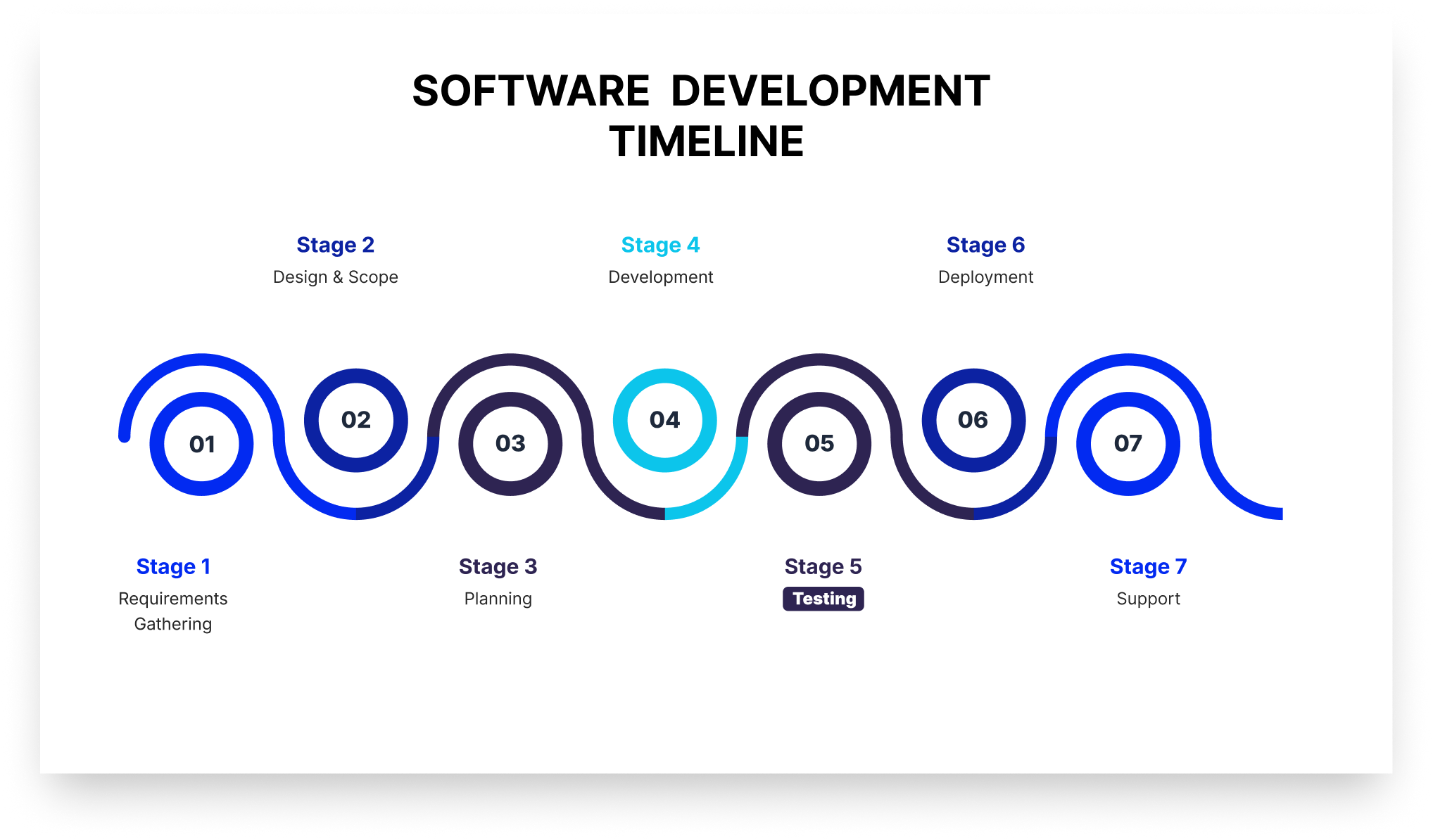
Shift-left testing refers to starting the testing activities as early as possible in the software development lifecycle rather than saving them for the end. The name “shift-left” comes from how development timelines are drawn. 

In the development chart, requirements sit on the left, production on the right, and testing has traditionally lived near the right edge (as visible in the picture below).

The software development timeline chart or the software development life cycle.

 “Shifting left” moves testing toward the beginning of that line, so it runs simultaneously with the other stages of the development process. 

A core benefit of shift-left testing is covers activities that prevent defects from being written at all. It reviews requirements for testability and defines acceptance criteria before a test is written. As a result, a defect caught in a requirements review never becomes code, saving time for developers. 

How Shift Left Testing Is Different From Traditional Testing

The difference between traditional testing and shift-left testing is not just about the tools you're using. It's more about how and when the QA will be involved in the product development. The table below shows the difference between shift-left testing and traditional testing in various aspects.

Traditional testing Shift left testing
When testing starts After development completes At requirements and design
Who owns quality The QA team Developers, QA, and security together
Feedback loop Days to weeks Minutes to hours
What triggers a test run A release candidate or handoff A commit or pull request
Defect discovery point Test phase or production Design, commit, or PR review
QA's primary role Finding defects Preventing them, plus deep exploratory work

The 4 Types of Shift Left Testing

Here are four common variants or types of shift-left testing that most agile teams follow:

1. Traditional Shift Left

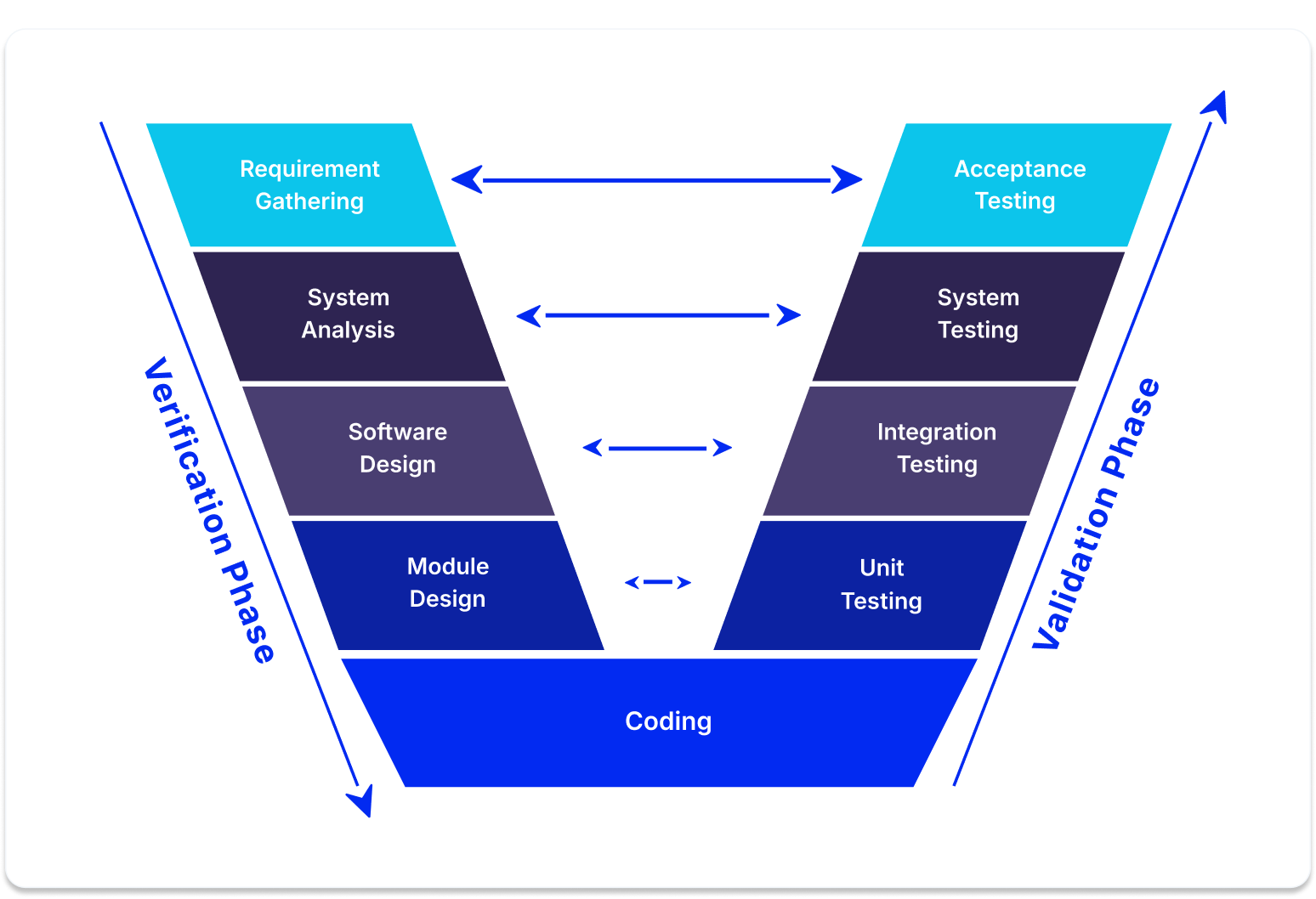
Traditional shift-left testing moves testing down and slightly left on the V model (see the image below). 

The V model in software testing

The V-Model is a step-by-step blueprint for building and testing software where every single development phase has a matching testing phase. It gets its name because the process bends upward after the coding stage, making the shape of the letter V.

It’s the type most people visualize when they talk about shift-left testing. For instance, if your team performs unit tests and integration tests early on, you’re doing traditional shift-left testing. 

2. Incremental Shift Left

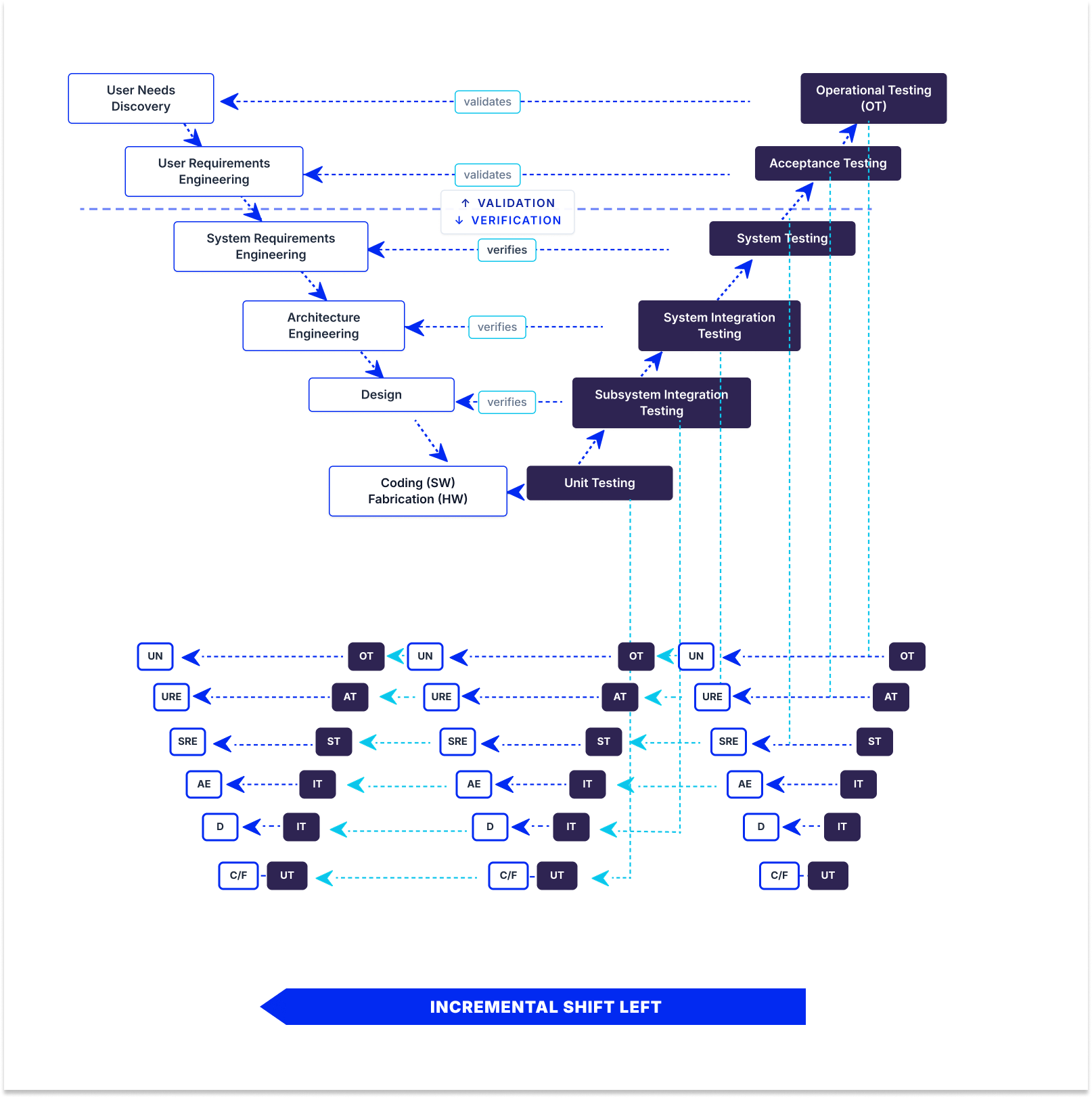
In incremental shift-left testing, the testing project breaks into smaller increments, each with its own V model (see the picture below). 

 Incremental shift-left testing where the V model breaks into smaller V models.

As a result, testing happens per increment rather than only once at the end. When each increment ships, developmental and operational testing shift left together. This is popular for large, complex systems with substantial hardware components, where you can’t test the whole system at once but can validate each subsystem as it’s built.

3. Agile/DevOps Shift Left

In Agile/DevOps shift-left testing, testing happens inside short sprints. Each sprint contains its own development and testing work. This means automated tests are triggered whenever there’s a code change in the CI/CD pipeline, so developers get the feedback the same day they change the code. 

4. Model-Based Shift Left

Model-based shift-left testing tests your model instead of code. It tests executable requirements, architecture, and design models, so testing begins almost immediately without waiting for code. The primary benefit of model-based shift-left testing is that you can catch requirements and expensive design defects. The catch is that model-based shift-left testing requires formal, executable models, which is why there is not a large adoption of this approach. 

Why DevOps Recommends Shift-Left Testing Principles

DevOps recommends shift-left testing principles for four reasons:

1. CI/CD pipelines require quality gates at every stage: A pipeline is a series of automated decisions about whether a change can proceed. If the only real check sits at the end, the pipeline isn’t deciding anything but only moving code toward one manual gate. Every stage needs its own criteria, including build, unit tests, static analysis, integration tests, and security scans.

2. Continuous deployment can’t wait for a manual QA cycle: If you deploy several times a day and your regression cycle takes three days, manual testing doesn’t work. If you stick to manual QA instead of automation, either deployment frequency drops to match testing or testing gets skipped. 

3. Shared quality ownership aligns with DevOps culture: DevOps dissolves the wall between development and operations. Leaving the “wall” of testing standing between development and QA reintroduces the same problem that DevOps tries to solve.

4. Faster feedback loops reduce context switching: A developer who gets a test failure immediately after pushing the change is still holding it fresh in their head, as opposed to someone who gets it later and has to find the context again.

How Does Automated Shift Left Testing Work

Automated shift-left testing relies on running fast and inexpensive checks early in the development process. It saves slow and expensive tests for later stages when code is more stable. 

The process starts at the pre-commit stage, where quick scans catch basic issues, such as formatting problems and leaked passwords. Next, when code is submitted for review, the system runs thorough unit tests and security checks within minutes. If anything fails at this review stage, the code cannot be merged into the main project. 

After merging, deeper integration checks and container scans run to ensure different parts of the system work together. Finally, comprehensive performance and end-to-end tests are run before the software is released to the public. Splitting tests into these distinct stages keeps the process fast so developers actually use it.

Mistakes to Avoid When Automating for Shift-Left Testing

When implementing automated shift-left testing, avoid these common pitfalls:

  • Writing tests after the fact: Tests written after code exists only confirm current behavior, including bugs, rather than validating requirements. Write tests from acceptance criteria to catch actual defects.
  • Slow test suites: Tests taking longer than 10 minutes force context switching as developers change tasks. Parallelize, stage tests, and trim low-value checks to keep runs fast.
  • Lack of ownership model: Clearly define who writes unit tests, maintains integration suites, and fixes broken pipelines. Without clear ownership, test suites decay and flaky tests get ignored.
  • Focusing on line coverage over defect escape rate: High line coverage does not guarantee meaningful assertions. Track the defect escape rate to measure true effectiveness.

Shift Left Testing Benefits

Adopting shift-left testing offers important organizational and operational benefits, including:

  • Lower defect cost: Bugs identified early in development are substantially cheaper and simpler to resolve than those discovered in production.
  • Faster release cycles: Continuous quality checks eliminate long stabilization periods prior to deployment.
  • Fewer production defects: Early checks catch architecture and requirements flaws before code reaches end users.
  • Shorter feedback loops: Developers address feedback immediately while context is still fresh.
  • Security cost reduction: Catching vulnerabilities during review avoids costly post-release incident response and patches.
  • Better collaboration: Early QA involvement fosters shared quality ownership across engineering teams.

Shift Left Testing Tools Worth Knowing in 2026

Effective shift-left testing relies on a modern toolkit tailored to every phase of the development lifecycle. Here are the top tools and frameworks essential for implementing shift-left testing in 2026:

Static Analysis and Secret Scanning

SonarQube: Analyzes source code for bugs and security vulnerabilities, enforcing quality gates directly on pull requests.

Semgrep: Lightweight static analysis using custom, code-like rules for fast feedback during development.

TruffleHog & Gitleaks: Scan repositories and commit histories via pre-commit hooks to catch secrets and API keys before they are pushed.

Unit and Integration Testing

JUnit, pytest & Jest: Essential unit testing frameworks for Java, Python, and JavaScript to build fast, automated test suites.

Testcontainers: Provides throwaway Docker instances for databases and services, removing shared-environment bottlenecks during integration tests.

API and Contract Testing

Postman & Newman: Enables teams to author API tests in a GUI and execute them automatically in CI/CD pipelines.

Pact: Facilitates consumer-driven contract testing to verify microservices independently without full deployments.

Dependency and Container Security

Snyk automatically scans third-party dependencies for vulnerabilities and opens automated pull requests for fixes.

Trivy: Fast open-source scanner for container images, filesystems, and infrastructure as code.

Trivy is an open-source scanner covering container images, filesystems, and infrastructure as code, fast enough to sit inside a build without slowing it down.

CI/CD Orchestration

GitHub Actions, GitLab CI & Jenkins: Automate and orchestrate pipeline stages, enforcing quality gates before code merges.

Shift Left vs. Shift Right Testing: What’s the Difference

Shift-left testing moves testing (left) earlier in the process, alongside or even before development. Shift-right testing moves testing (right) later into the process, into the production environment, with real data. 

The entire concept of shift-right testing is that some defects cannot be truly uncovered before real users hit real infrastructure, so it tests on actual traffic patterns, third-party behavior under load, and edge cases. 

TestFiesta Gives Your Shift Left Strategy Somewhere to Land

Shift-left testing aggregates results across multiple systems (CI unit tests, post-merge contract tests, PR security scans, and sprint exploratory sessions), often making release readiness difficult to track.

TestFiesta consolidates these sources into a single view by ingesting automated CI pipeline results alongside manual and exploratory test outcomes through its Automation API.

Reusable configurations allow test cases to execute across multiple browsers, devices, and environments without duplication, while shared steps centralize common workflows like login or checkout to streamline suite maintenance.

Built-in defect tracking connects failures directly to test executions. Integrations with Jira and GitHub automatically sync fields, update statuses, and create context-rich issues from failed runs.

Organizations use folders, tags, and custom fields to map automated run data. Pricing is a flat $10 per user per month with all features included.

Ready to Elevate Your Shift-Left Testing Strategy?

Streamline your quality workflow, centralize your test results, and empower your team to ship faster with confidence.

Start your free trial today

FAQs

Does shift-left testing mean developers replace QA engineers?

No, shift-left testing does not mean that developers replace QA engineers. It changes what QA spends time on. Repetitive testing is automated, and developers write tests alongside their code, while QA moves toward work that requires critical judgment, such as reviewing requirements for testability, designing test strategy, exploratory testing, and owning the quality signal. 

How do you measure whether shift-left testing is actually working?

To measure whether shift-left testing is actually working, you should track essential software testing metrics, including defect escape rate, the percentage of defects found in production rather than before release, mean time to detect, and pipeline duration, since a slow pipeline gets bypassed. 

What’s the difference between shift-left testing and test-driven development (TDD)?

Shift-left testing is a broad strategy that moves all quality activities, including requirements reviews, static analysis, and security scans, earlier in the development process. Test-driven development (TDD) is just one specific practice within that broader strategy, where you write a failing test before writing the code to pass it and refactor the results. Simply put, you can practice shift-left testing without using TDD, but you cannot do TDD without shifting left.

Testing guide
Best practices

Ready for a Platform that Works

The Way You Do?

Stop fighting your tools. Start shipping with confidence. TestFiesta adapts to your workflow, not the other way around.

Welcome to the fiesta!